Migrating data pipelines from Azure Data Factory (ADF) to Snowflake OpenFlow is one of the more complex engineering tasks a data team can undertake. Every pipeline carries years of embedded business logic — activity orchestration, credential configurations, control flow patterns, and transformation expressions — all of which must be faithfully reproduced in a completely different execution model.
Doing this manually is slow, error-prone, and requires deep simultaneous knowledge of both platforms. What if an AI agent could do this automatically, guided by a structured knowledge base that continuously improves through real-world use?
This blog answers how we built the adf-migration skill for Snowflake CoCo — what it is, how it works, the methodology we used to build it correctly, and how it learns from every migration it helps with. It also delves into how we used CoCo (Cortex Code) to automate pipeline migrations from Azure Data Factory (ADF) to Snowflake OpenFlow — and built a skill that learns from every deployment.
What Is a CoCo Skill?
CoCo (Cortex Code) is Snowflake’s agentic AI framework. It can execute multi-step tasks autonomously using tools, code execution, and structured knowledge bases. The knowledge bases are called skills.
A skill is not a prompt. It is a carefully structured set of reference files that tell CoCo exactly how to perform a complex, multi-step technical task — which processors to create, which properties to set, in what order, and what to do when things go wrong.
The critical distinction: a prompt tells an AI what to do in general. A skill tells it exactly how to do it in a specific environment, with specific tools, verified against a specific runtime.
Our adf-migration skill consists of a coordination file (SKILL.md) and five reference files, each responsible for a specific domain of knowledge. The skill folder lives at ~/.snowflake/cortex/skills/adf-migration and is version-controlled for team access.
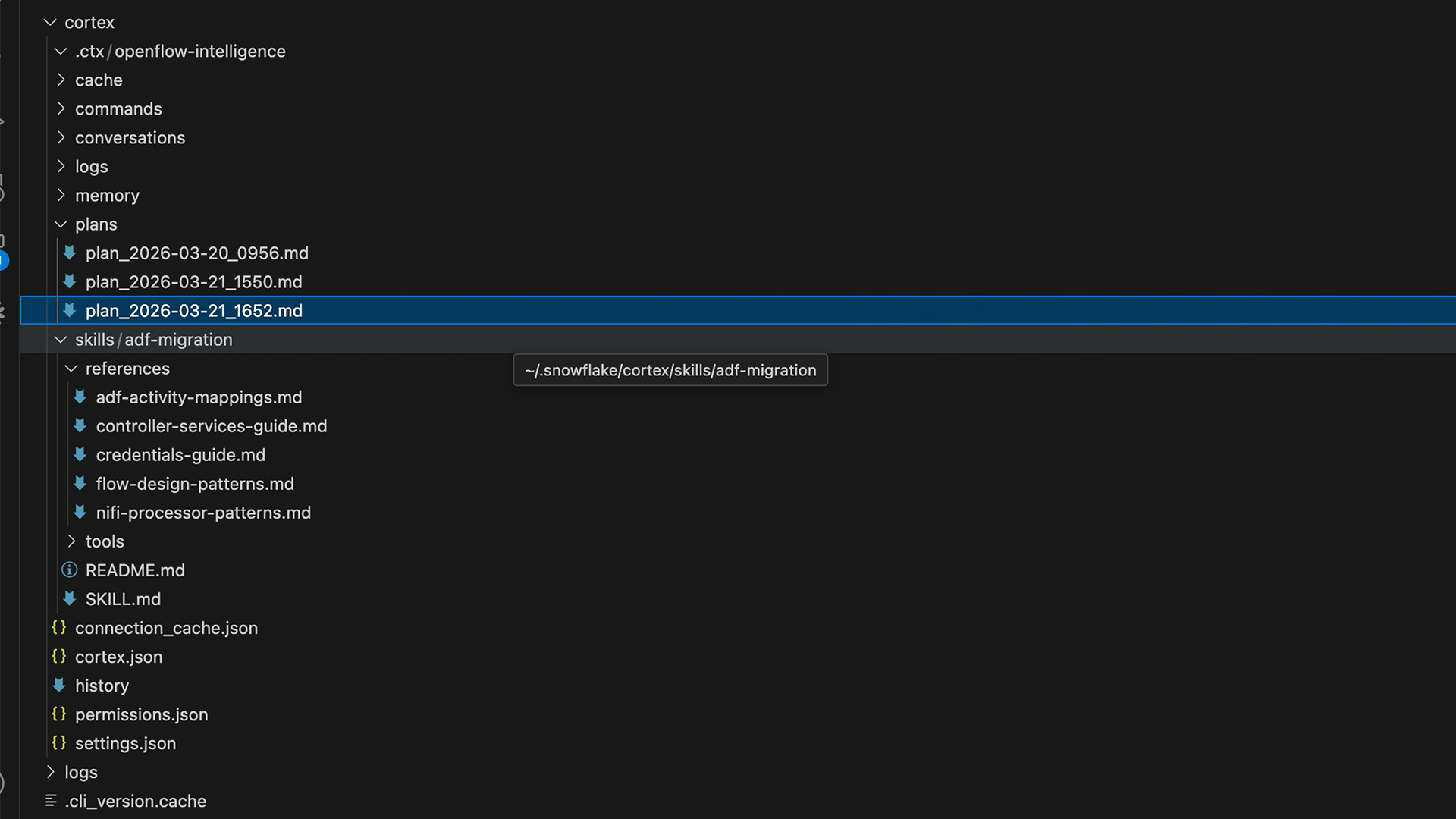
Figure 1: The adf-migration skill folder — SKILL.md, reference files, tools directory, and CoCo plan history
Reference Routing
The SKILL.md coordination file contains a routing table. When an engineer asks a question, CoCo loads only the reference files relevant to that question. The rule is explicit: load before answering, never answer from memory.
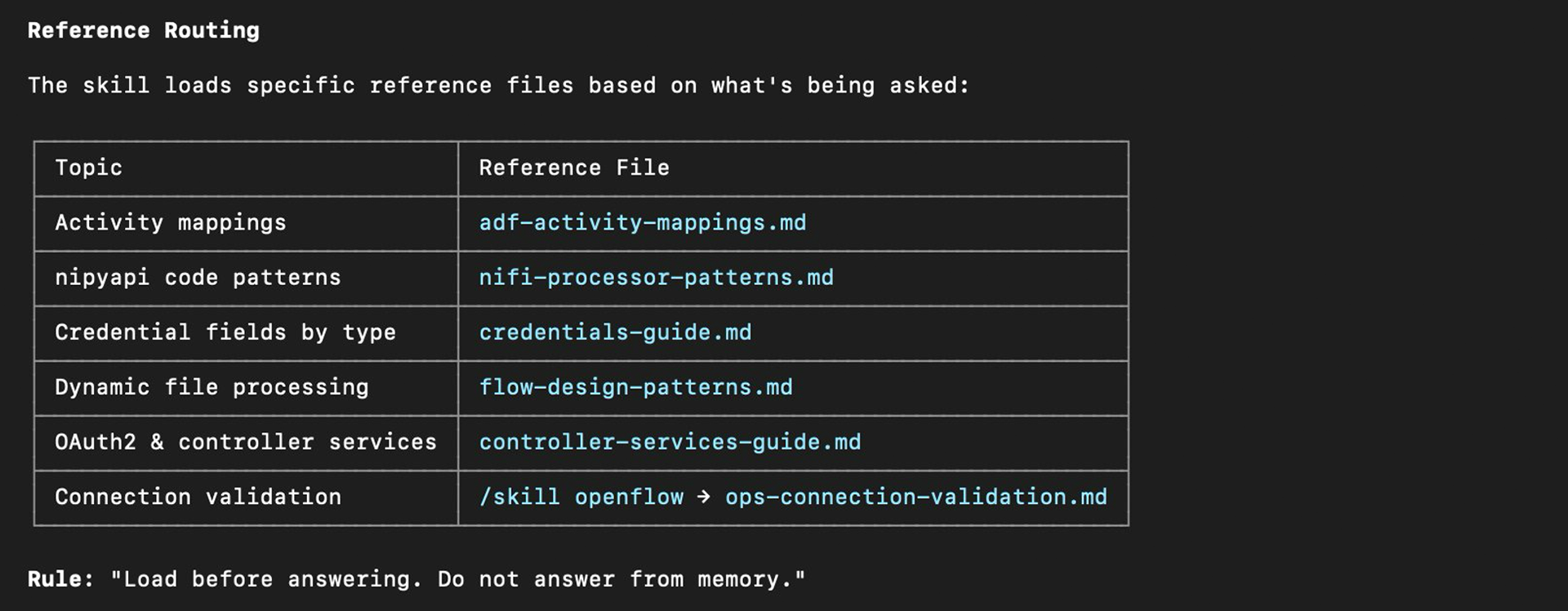
Figure 2: Reference routing table — CoCo loads specific files based on topic, never answers from memory
The Migration Problem
ADF and OpenFlow (NiFi) represent fundamentally different execution models. ADF pipelines are declarative JSON definitions that include activity types such as Copy, Lookup, ForEach, IfCondition, and ExecutePipeline. OpenFlow is a processor graph where data flows as FlowFiles through connections with named relationships.
The mapping is non-trivial at every level. A Copy activity with a SQL Server Source maps differently from one with a SharePoint Online List Source. ForEach and IfCondition have no direct NiFi equivalent — they require process groups with input and output ports, routing processors, and carefully sequenced connections. A skilled engineer doing this manually takes 2-4 hours per pipeline. At scale, this becomes the primary delivery bottleneck.
The Two-Phase Workflow
The skill implements a deliberate two-phase workflow. Phase 1 produces a complete migration plan without deploying anything. Phase 2 executes the plan after the engineer’s approval. Engineers review the feasibility of migration before providing any sensitive credentials.
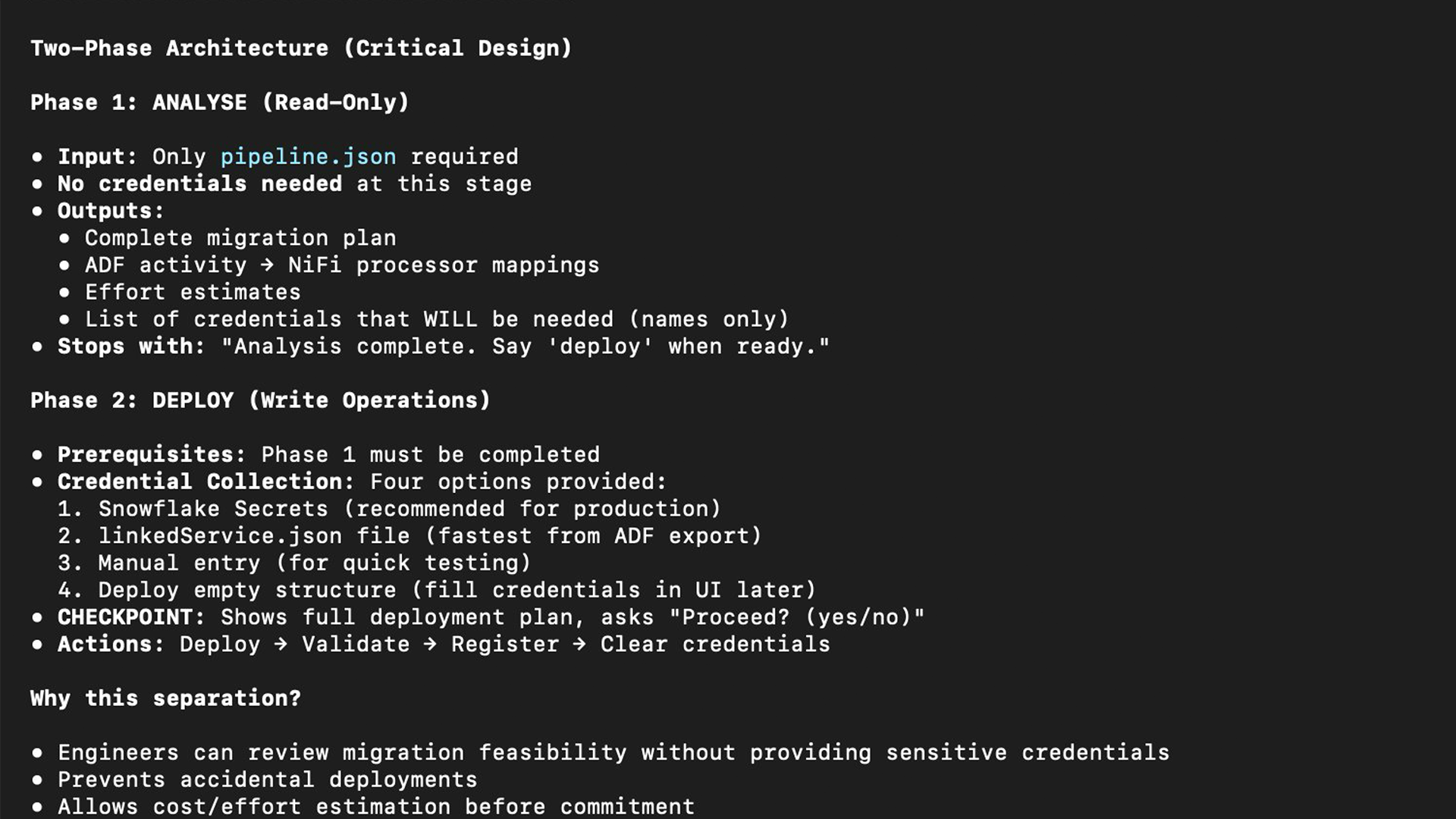
Figure 3: Two-phase architecture: Phase 1 is read-only analysis, Phase 2 deploys only after explicit approval
Phase 1 — Analysis and Planning
CoCo reads the ADF pipeline JSON and produces a structured plan: a complete activity inventory with NiFi processor mappings, a connection plan with exact relationship names, a credential collection strategy, an effort estimate, and flags for patterns requiring special handling, such as ForEach activities that need process group ports.
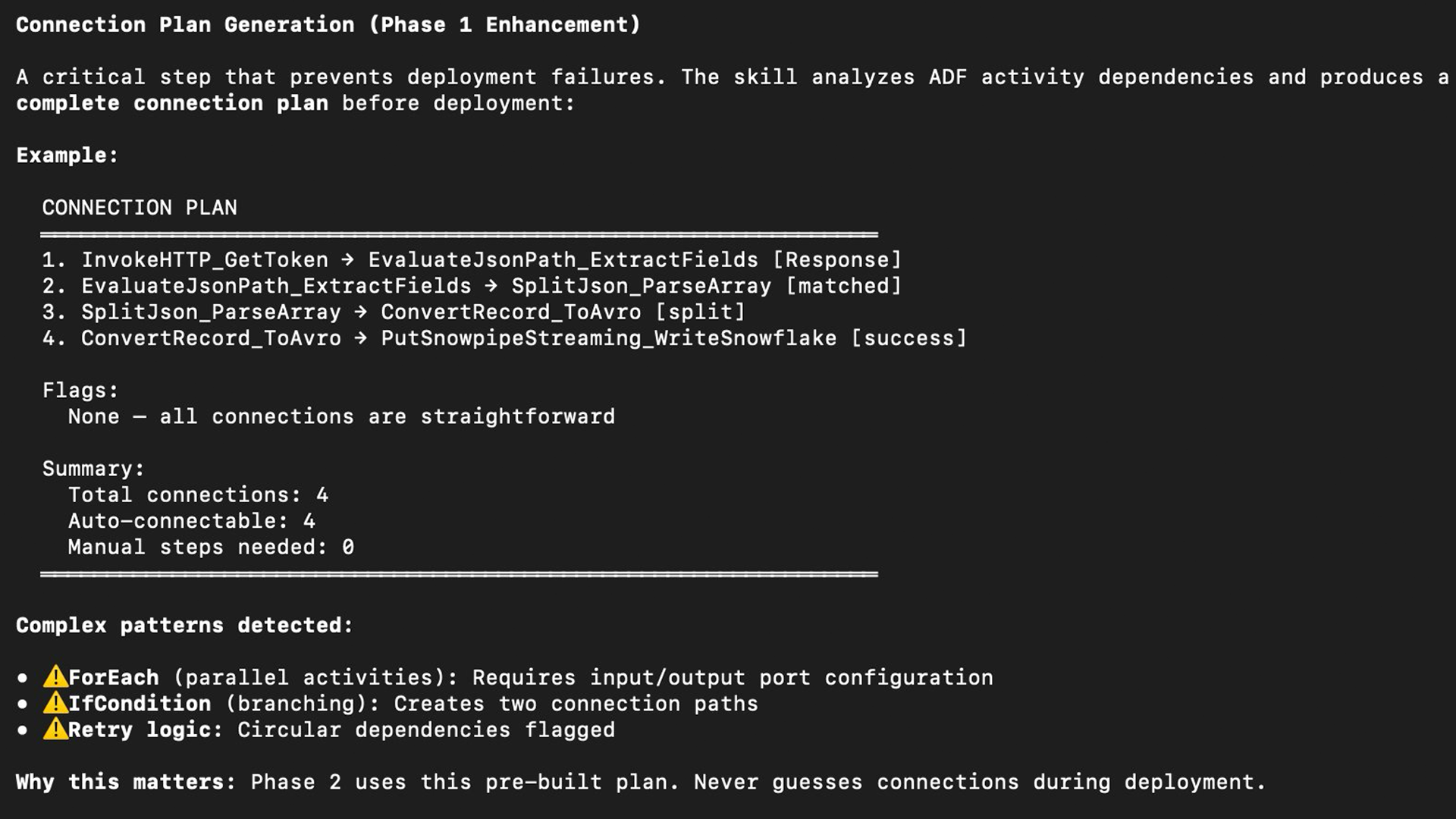
Figure 4: Phase 1 connection plan — exact processor-to-processor connections with relationship names, built before any deployment
Phase 2 — Deployment
After approval, CoCo deploys using nipyapi. Every NiFi modification follows the Check-Act-Check pattern — inspect state before making a change, act, then verify the change took effect before proceeding to dependent steps.
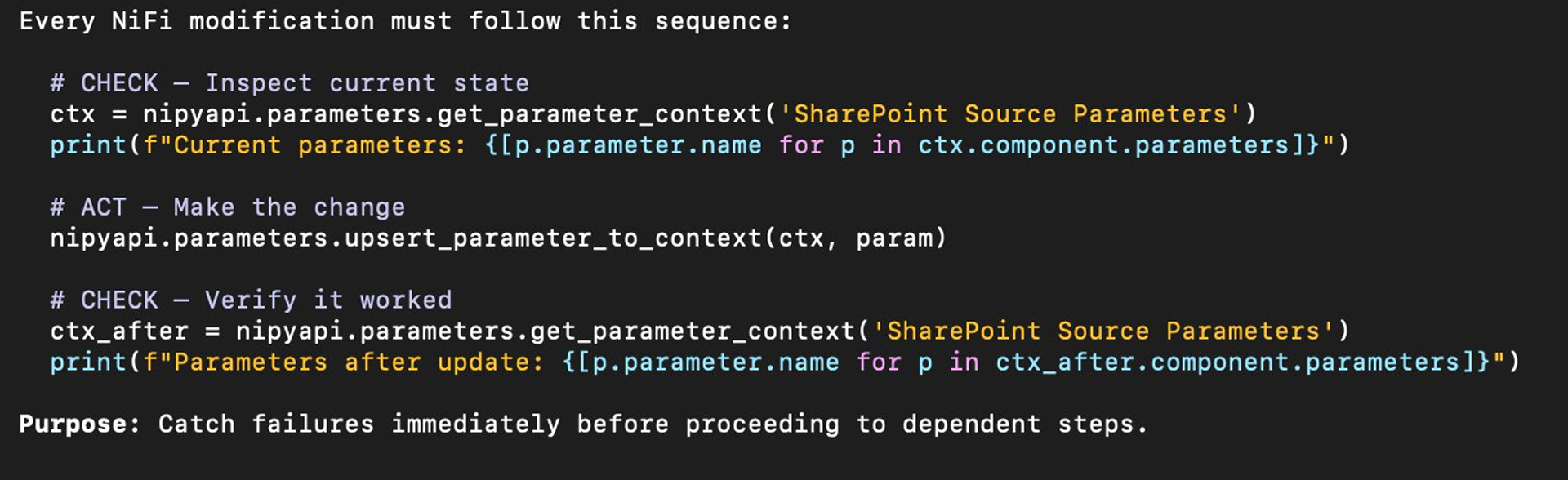
Figure 5: Check-Act-Check pattern — every Phase 2 operation verifies state before and after each change
The Skill-Building Methodology: Three-Source Verification
The most important architectural decision was how to add content to the skill. Early in the build, we were documenting processor properties from memory and official documentation — and getting them wrong.
Before adding any processor or controller service to the skill, we run three-source verification: (1) check the openflow skill references, (2) check official Snowflake and NiFi documentation, (3) query the live runtime directly. Runtime output is the ground truth. When sources conflict, the runtime wins.
The Discovery Script
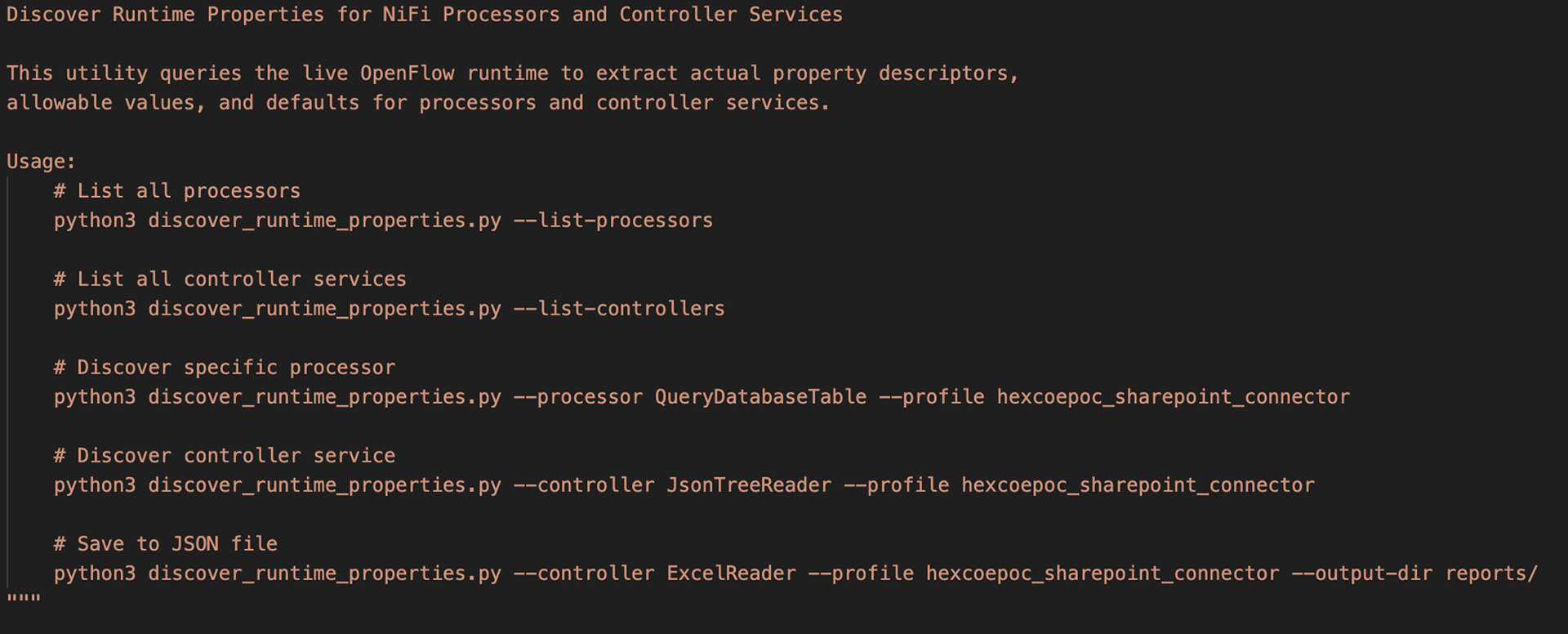
We built a Python utility (discover_runtime_properties.py) that queries the live OpenFlow runtime and returns exact property names, allowable values, defaults, and required flags for any processor or controller service. Discovery reports are committed to the repository alongside the documentation they inform. When the runtime upgrades, we re-run discovery and diff the reports to catch changes before engineers encounter them in production.
Content Labels
Every section in skill reference files carries an explicit verification label so engineers know exactly how much confidence to place in each pattern:
- VERIFIED PATTERN — confirmed from live runtime, docs, and real production usage
- DOCS CONFIRMED — confirmed from official documentation, not yet tested in this runtime
- REFERENCE IMPLEMENTATION — based on API docs, use with caution in production
- DO NOT USE — confirmed incorrect, kept to prevent re-adding
A Skill That Grows From Real Use
No skill is complete on day one. The more valuable design decision is what happens when the skill encounters a question it cannot answer.
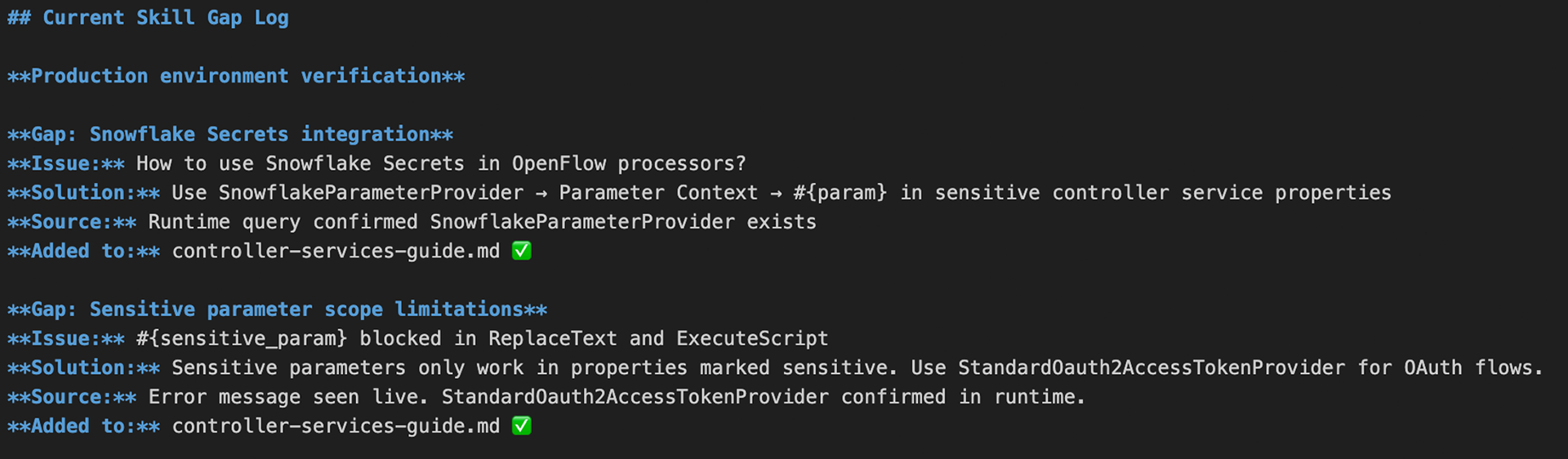
In our workflow, every unanswered question becomes a structured gap entry. The engineer notes the question, investigates using the three-source process, documents the verified answer, labels it with the appropriate confidence marker, adds it to the correct reference file, and updates the gap log with the source of verification.
The rule is simple: if an engineer has to look something up because the skill does not have the answer, that answer belongs in the skill before the next engagement.
This process has surfaced gaps that no amount of upfront planning would have caught — edge cases in how NiFi handles sensitive parameters, undocumented differences between processor types that appear identical in documentation, and authentication behaviors that only manifest in specific provider configurations.
The gap log in SKILL_BUILDING_GUIDE.md tracks every entry: the question that triggered it, the verified answer, the source (runtime query, official docs, or live production observation), and the reference file updated. This log is committed to the repository alongside the skill files so the team can see exactly how the skill evolved and why each entry exists.
The Gap Log Format
Each entry follows a consistent structure:

Over time, the gap log becomes as valuable as the reference files themselves. It shows which patterns were hard to get right, which error messages are most commonly encountered, and which parts of the skill have been tested against production versus documented solely from API references.
How the Skill Learns
Beyond the gap log, we designed three feedback loops to continuously improve skills through real use.
Loop 1: Engineer Questions
Every question the skill cannot answer is added to the gap log with the verified answer. The skill improves after every production engagement. The compound effect is significant — a skill that starts with gaps in credential handling, controller service configuration, and file format processing becomes progressively more complete with each engagement it supports.
Loop 2: Runtime Discovery
When the OpenFlow runtime upgrades, the discovery script re-runs against all documented processors. Diff reports identify property additions, removals, and default changes. Documentation is updated before engineers encounter the changes in production.
Loop 3: Completed Migrations
SP_EXTRACT_SKILL_PATTERNS is a Snowflake stored procedure in design that runs weekly against migration audit tables. It identifies patterns that succeeded consistently across multiple migrations, flags patterns that repeatedly required manual intervention, and generates a SKILL_IMPROVEMENT_SUGGESTIONS table for engineer review.
The flywheel: more migrations → more audit data → better pattern extraction → more accurate skill → faster migrations. The skill becomes more reliable with every deployment it helps with.
Conclusion
The most important lesson from building this skill is methodological, not technical. A skill built from memory and assumptions fails quietly. A skill built from three-source verification, with an explicit process for capturing gaps from production use, is one that engineers can trust.
The adf-migration skill today covers 20+ activity types, six verified reference files, a discovery utility that keeps documentation accurate across runtime upgrades, and a gap log that grows with every engagement. More importantly, it has a methodology for getting better. That architecture — a skill that learns from real usage rather than assumptions — is the one worth building.
Start Your Intelligent ADF Migration Journey
Ready to move beyond manual ADF migrations?
Talk to our Snowflake and Data Modernization experts today to request a Snowflake CoCo ADF Migration Assessment.
- Assess your ADF estate with Snowflake CoCo
- Build a scalable, intelligent migration capability
- Accelerate time‑to‑value on Snowflake
- Reduce risk, cost, and complexity
Your path to intelligent, future‑ready data transformation starts with Hexaware!