Today, businesses rely on data more than ever, but combining information from diverse sources, keeping up with real-time changes, and ensuring rapid processing can be challenging. Traditional tools often feel slow, inflexible, and difficult to scale to meet modern enterprise needs.
Databricks Lakeflow Connect addresses these challenges by simplifying data ingestion and letting enterprises integrate data from various sources seamlessly and use it more effectively without the usual complexities.
McKinsey reports, companies that successfully adopt unified, cloud-enabled data platforms and treat data as a product can achieve EBITDA growth of 7–15% by unlocking new business models, improving process efficiency, and reducing IT costs.
What is Databricks Lakeflow Connect?
Databricks Lakeflow Connect is a unified, intelligent solution for data ingestion, designed to streamline and accelerate the process of bringing data into the Databricks Data Intelligence Platform. It offers a no-code, automated approach to ingest data directly into Delta Lake, supporting both batch and streaming workflows.
With built-in connectors, Lakeflow Connect improves integration with databases, enterprise applications, cloud storage, and file systems, allowing you to access and manage your data wherever it resides. It simplifies data integration, enhances data quality, and ensures strong governance, making it an essential tool for modern data engineering.
What’s New for Databricks with Lakeflow Connect?
Lakeflow Connect was announced by Databricks in April 2025 at the Databricks Data + AI Summit 2025, coming known to have evolved into a powerful ingestion solution.
Built natively on the Databricks Data Intelligence Platform, it leverages advanced features like Unity Catalog for governance and Serverless Compute for performance optimization.
Gartner predicts that 50% of global enterprises will adopt Function Platform as a Service (fPaaS) by 2025. Lakeflow Connect supports this shift by offering serverless, scalable ingestion with built-in governance, enabling teams to handle modern data needs reliably and efficiently.
This lets your teams manage modern data needs reliably and flexibly.
Benefits of Unity Catalog with Lakeflow Connect
Unity Catalog, when integrated with Lakeflow Connect, provides a robust framework for data governance and management, streamlining data engineering workflows. Here are the key benefits based on available information:
- A centralized governance layer for Connect
- Simplified data ingestion with governance
- Improved data discovery and access control
- Scalable and efficient data management
Benefits of Serverless Compute with Lakeflow Connect
Lakeflow Connect uses Serverless Compute to provide:
- Fully managed, secure clusters that are seamlessly integrated with Unity Catalog for efficient governance.
- Up to 3.5x faster performance and 30% greater cost-effectiveness, optimizing speed and reducing expenses.
Understanding The New Features of Databricks Lakeflow Connect
At the Databricks Data + AI Summit 2025, Databricks announced significant updates to Lakeflow Connect, including new connectors and enhanced integration capabilities, making it a cornerstone for modern data engineering.
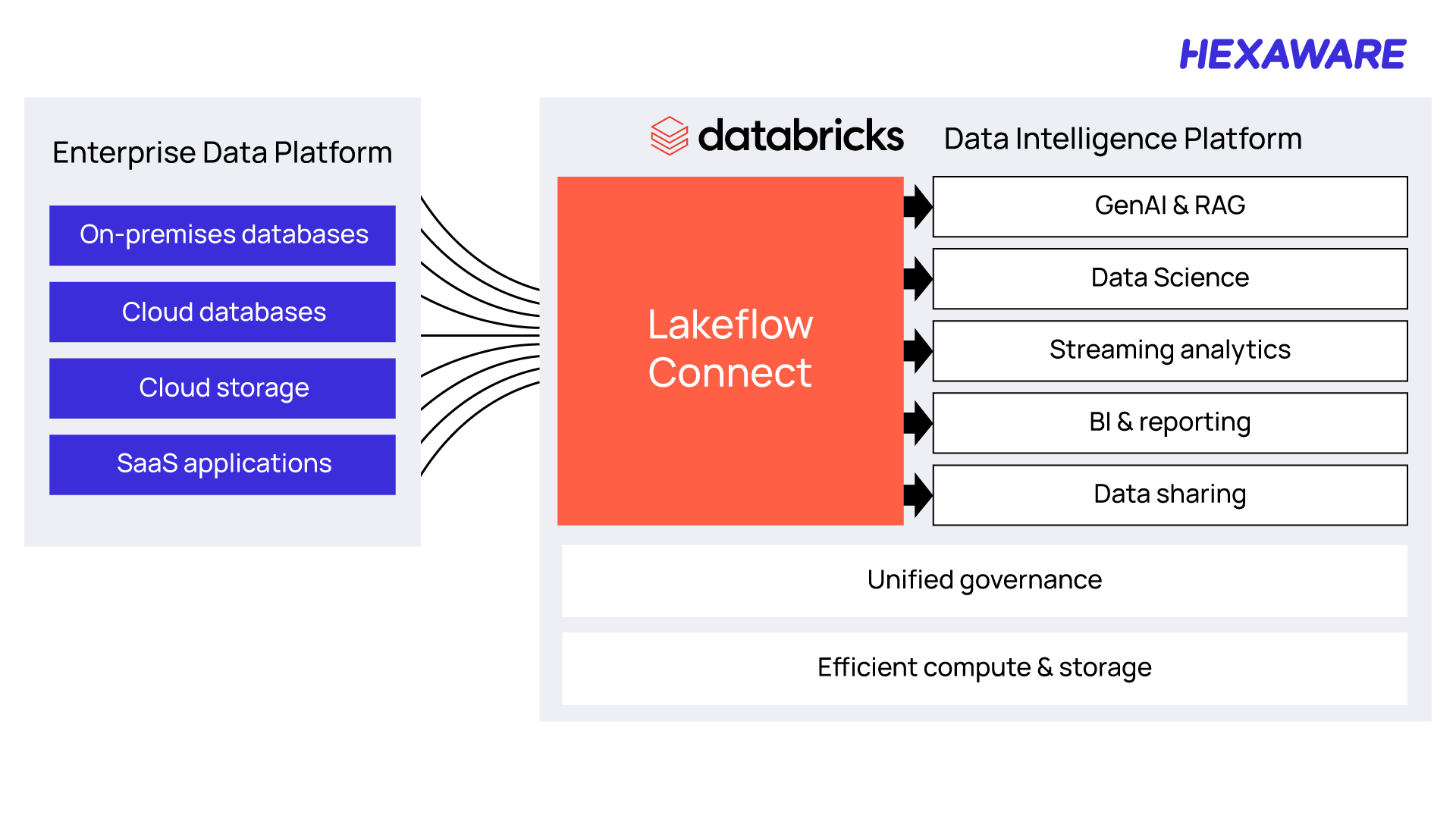
New Features Launched at Data + AI Summit 2025
The Databricks Data + AI Summit 2025 showcased Lakeflow Connect’s evolution into a robust, enterprise-ready solution. Key updates include:
Expanded Connector Ecosystem
Lakeflow Connect now supports a broader range of native connectors, including Salesforce Sales Cloud, Workday, Google Analytics 4, ServiceNow, SharePoint, Microsoft SQL Server, PostgreSQL, and Oracle NetSuite.
These connectors enable ingestion from enterprise applications, databases, and cloud sources without custom integrations. Databricks also announced upcoming connectors for SFTP, MySQL, IBM DB2, MongoDB, and Amazon DynamoDB, further expanding its reach.
Real-Time and On-Demand Ingestion
Lakeflow Connect now supports advanced Change Data Capture (CDC) for real-time and on-demand data replication. This ensures low-latency data transfers, critical for dynamic analytics and AI-driven workflows.
Serverless Compute Integration
Lakeflow Connect operates on serverless compute across AWS, Azure, and GCP, providing scalability and cost efficiency. It eliminates the need for manual infrastructure management, allowing teams to focus on data insights rather than setup.
Unified Governance with Unity Catalog
All ingested data is automatically governed through Unity Catalog, offering end-to-end data lineage, access control, and observability. This ensures compliance and auditability while maintaining data quality across workflows.
No-Code Ingestion Interface
Lakeflow Connect’s intuitive UI allows users to set up ingestion pipelines with just a few clicks, making it accessible to both technical and non-technical users, such as analysts and business teams.
These enhancements position Lakeflow Connect as a game-changer for enterprises aiming to consolidate data ingestion and accelerate time-to-insight.
When Do You Get to Use These Features?
Databricks Lakeflow Connect is now in General Availability as of the Databricks Data + AI Summit 2025, with connectors for Salesforce Sales Cloud, Workday, Google Analytics 4, ServiceNow, SharePoint, Microsoft SQL Server, PostgreSQL, and Oracle NetSuite. Additional connectors for SFTP, MySQL, IBM DB2, MongoDB, and Amazon DynamoDB are in development and expected to roll out soon.
Note: Databricks ensure these alternatives will be backward compatible once Lakeflow is fully rolled out.
Using the New Lakeflow Connect Features with Delta Lake
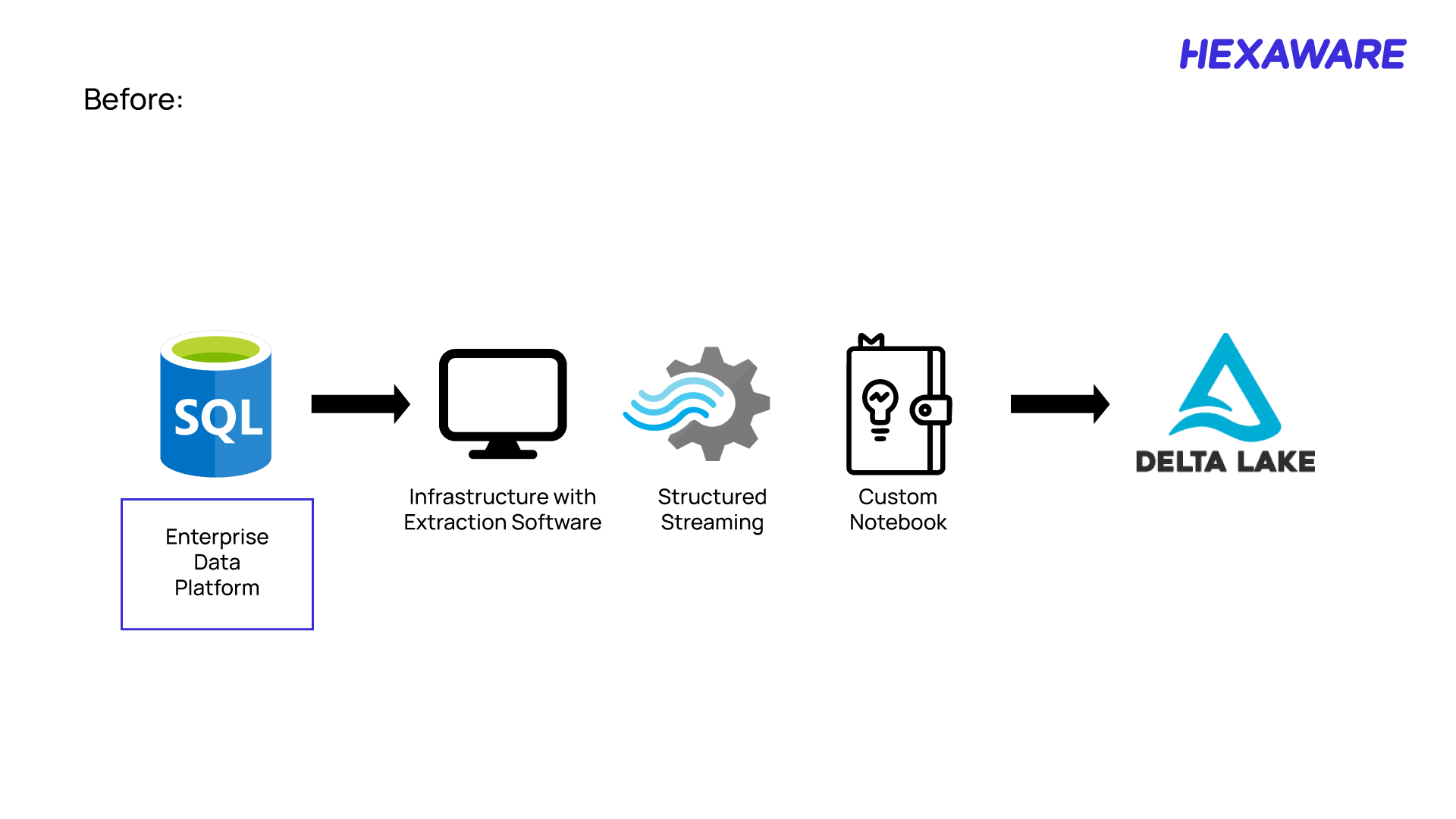
Traditionally, connecting to data sources and moving data into Delta Lake required multiple steps and tools, often involving complex workflows and custom integrations. With the Lakeflow Connect feature, the process is simplified tenfold.
The current process to connect and transform the data from source to delta lake.
The native, built-in connectors allow you to move data from popular SaaS applications and databases directly into Databricks in a single, efficient step.
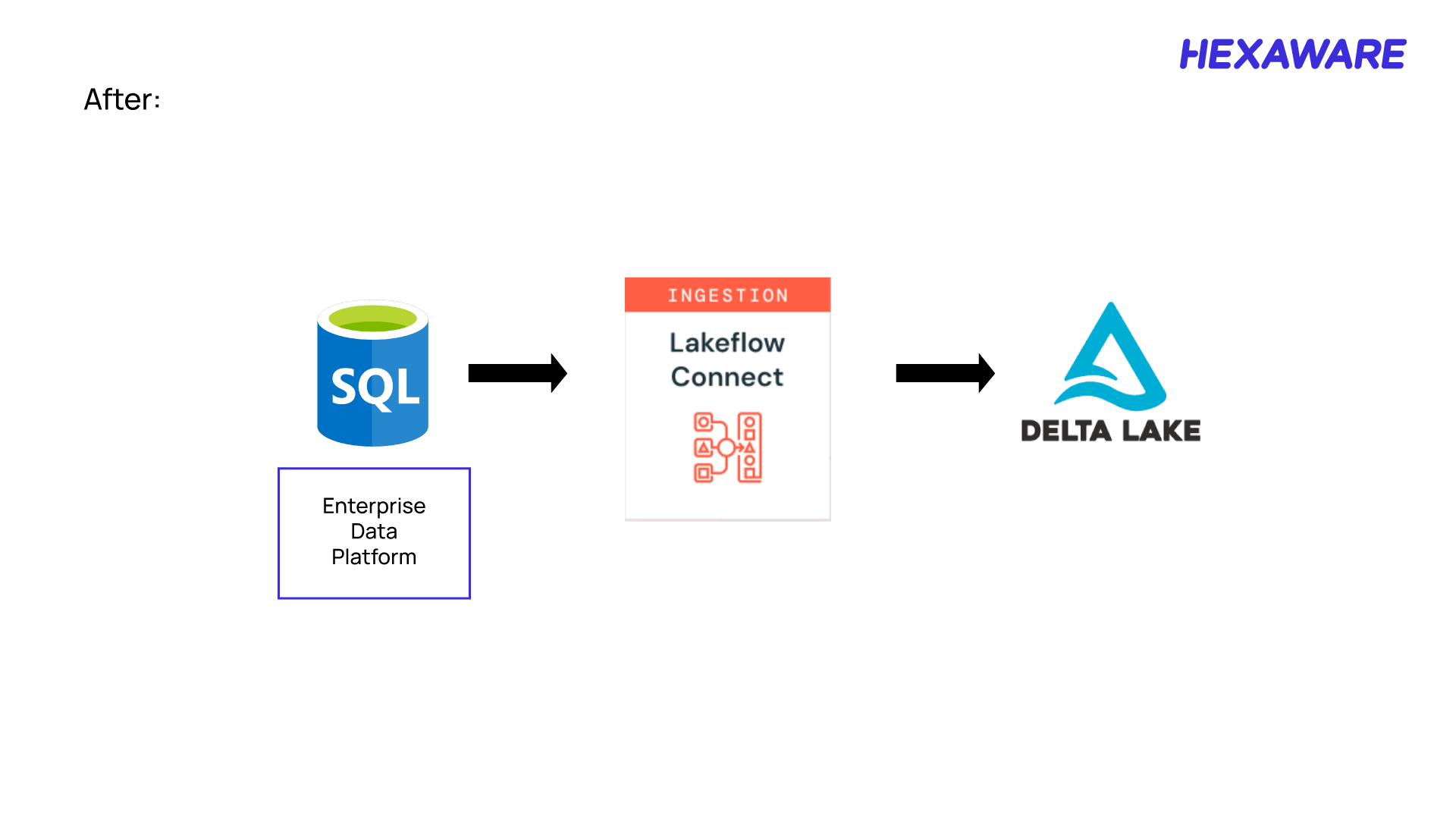
Simply put, the Lakeflow Connect feature replaces multi-step, manual data ingestion with a unified, automated solution—making data integration faster, easier, and more reliable.
How to Use Lakeflow Connect to Create a Data Ingestion Pipeline
To help you better understand how Databricks Lakeflow Connect works, let’s walk through a practical example of building Data Ingestion Pipeline using Lakeflow Connect.
As an example, we’ll ingest data from a Databricks Salesforce integration in Databricks. This step-by-step example will show how you can move through the process easily.
1. Create the Salesforce connection
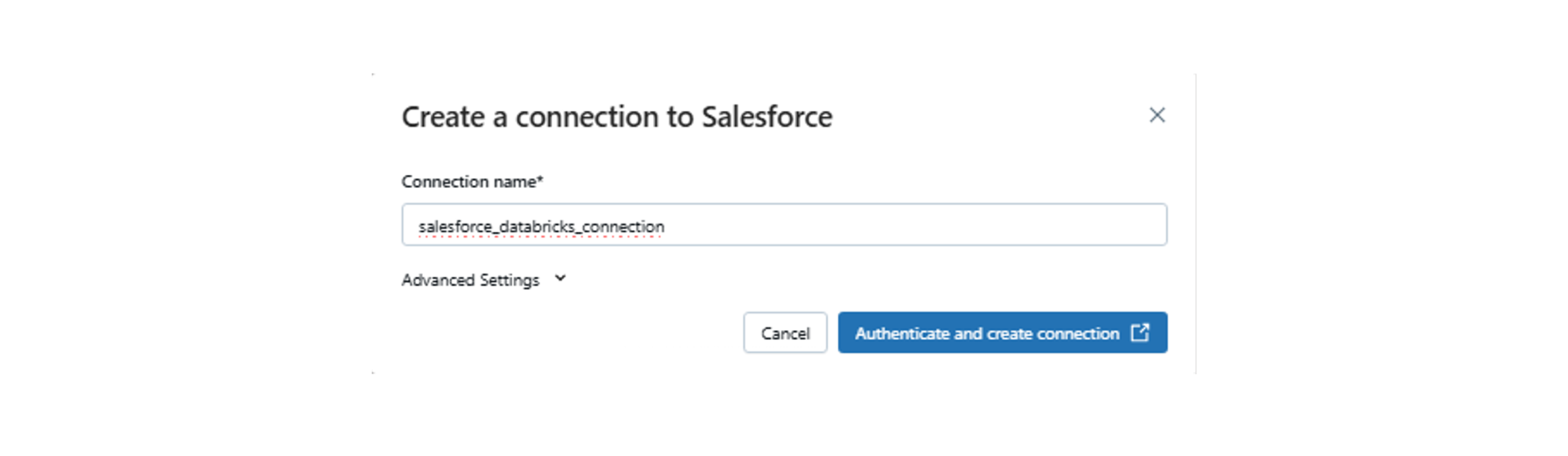
To establish a connection between Databricks and Salesforce using Lakeflow Connect, you need to provide your Salesforce login credentials—specifically, your Salesforce username and password.
When setting up the connection within Databricks, you typically navigate to the workspace, go to the Catalog > External locations > Connections section, and initiate the process to create a new connection. During this setup, you’ll be prompted to enter a unique connection name and select Salesforce as the connection type. After that, you input your Salesforce credentials to complete the authentication process.
Once authenticated, Databricks can use this connection to ingest data directly from Salesforce, leveraging the native connector for simplified and secure data integration.
2. Create a pipeline using the Salesforce Databricks connector
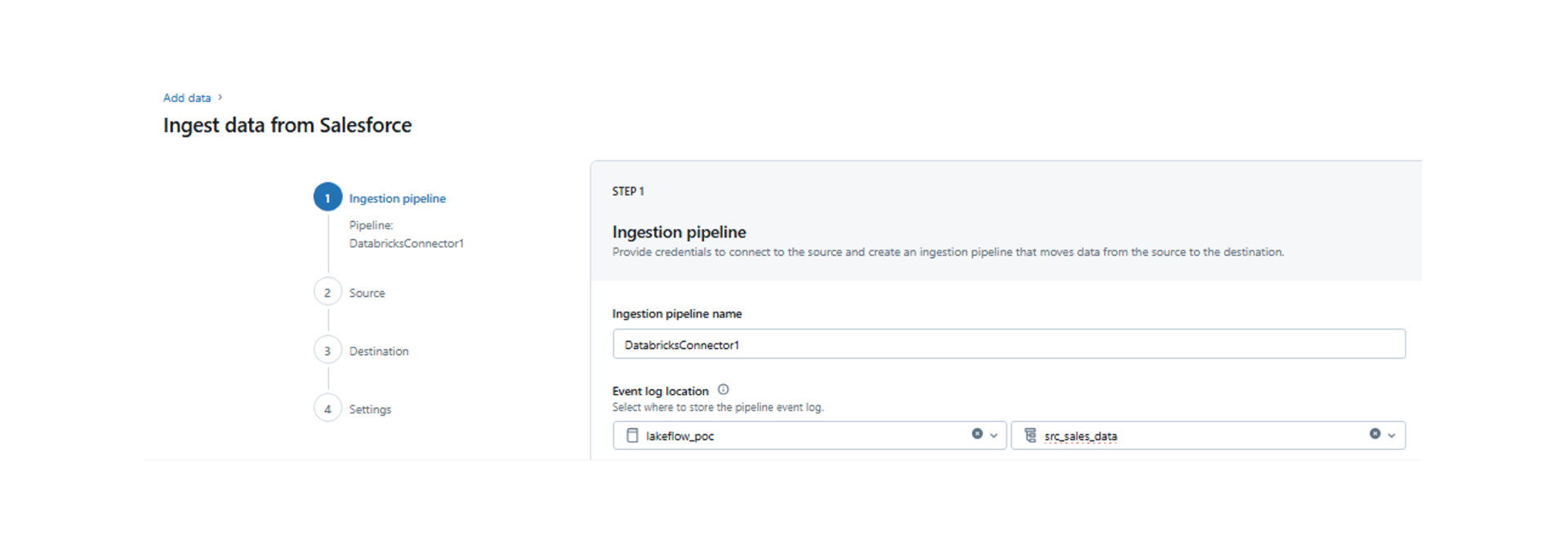
Navigate to the ‘Data Ingestion’ tab and click on the ‘Salesforce’ connector under ‘Databricks connectors’.
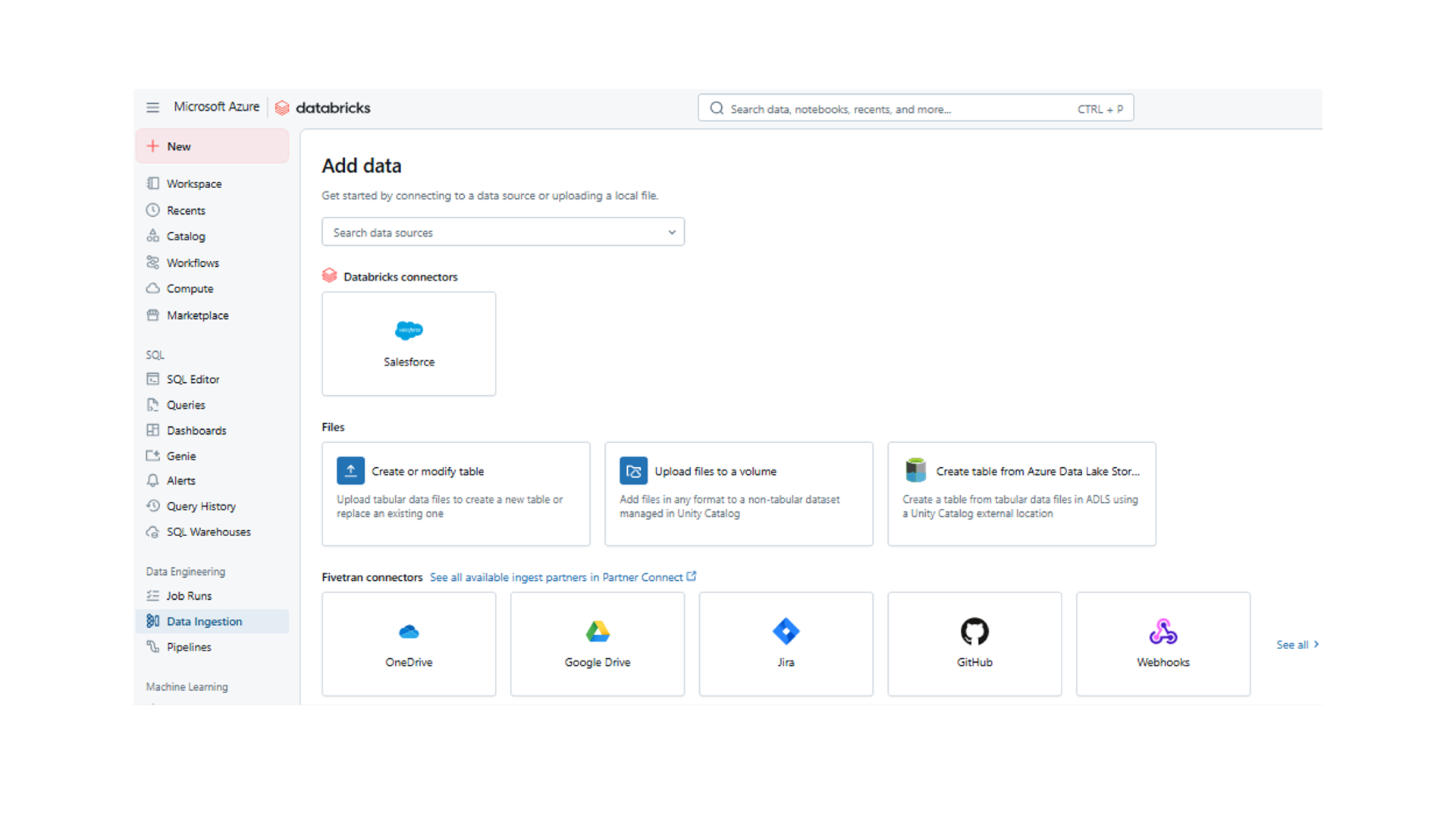
- Specify ‘Ingestion pipxeline Name’, ‘Event log location’ and ‘Schema’.
- If you already have the connection string ready you can select or else, click on ‘Create connection’ and specify the connection name and click on ‘Authenticate and create connection’.
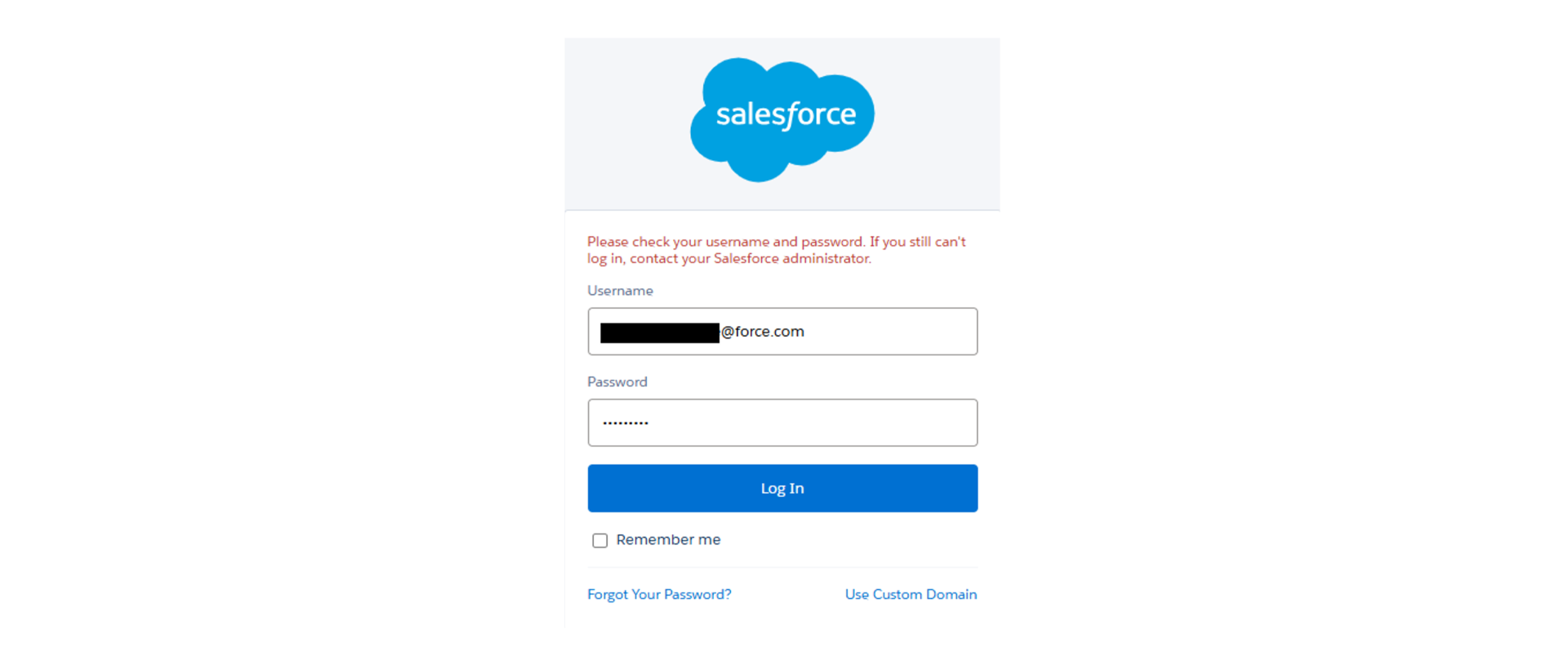
- After clicking on ‘Authenticate and create connection’ it will redirect you to the ‘Salesforce login’. Please specify your salesforce ‘Username and password’ or else you can connect using connection string as well.
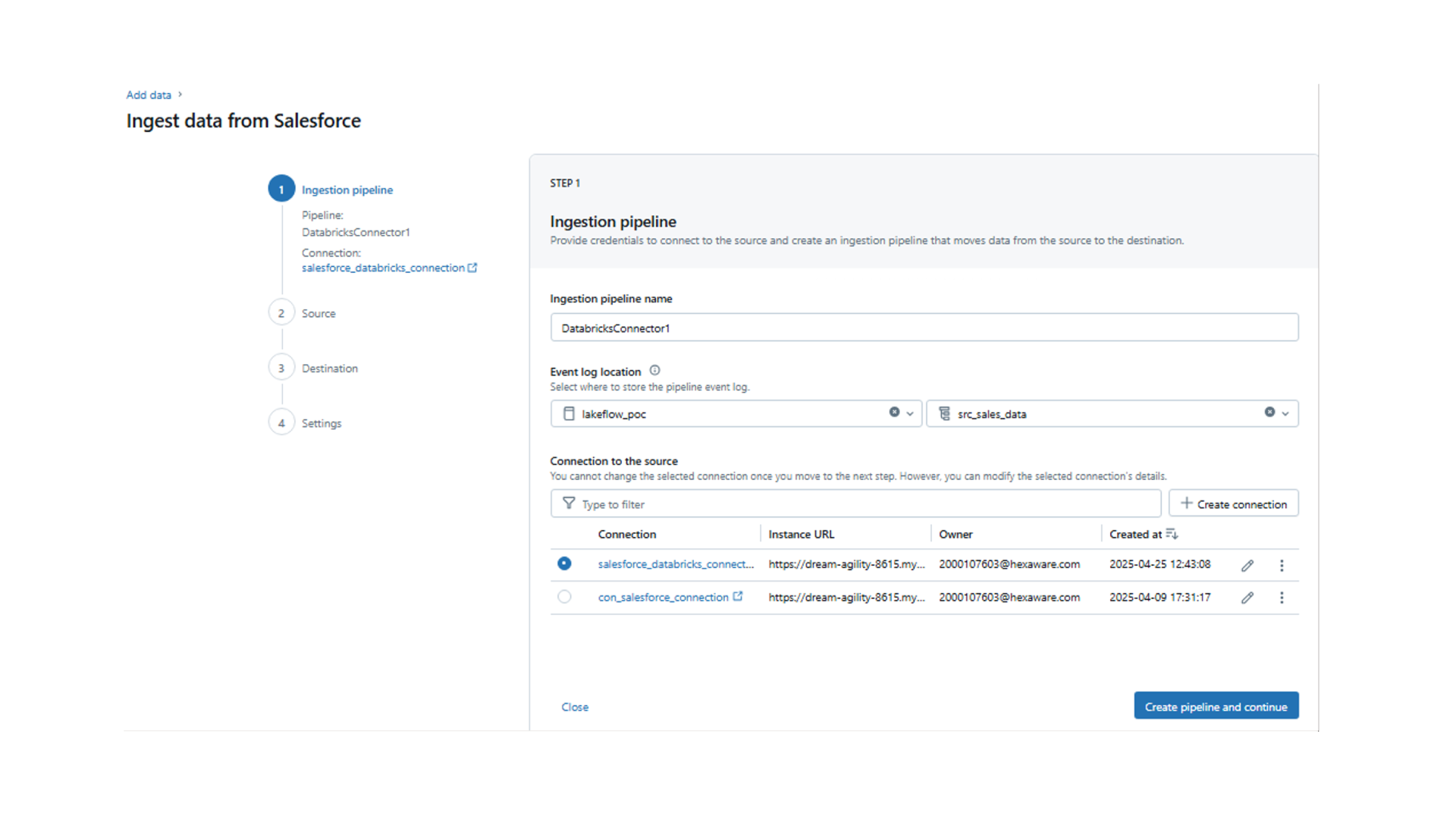
- Once the connection is established successfully, you will see the connection details. Now Click on ‘Create pipeline and continue’.
- Now you can view the tables available within Salesforce and select the tables that need to be ingested.
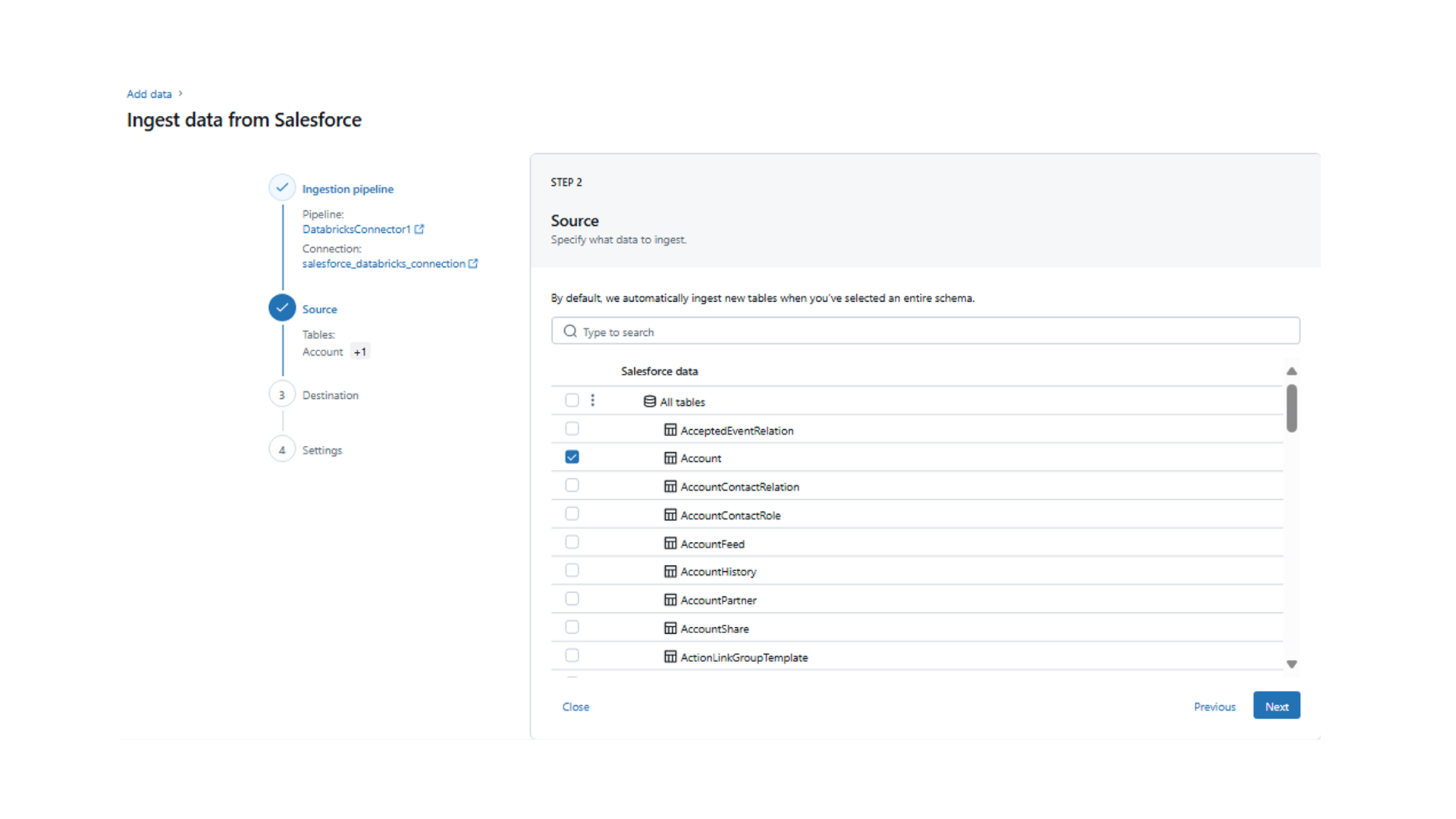
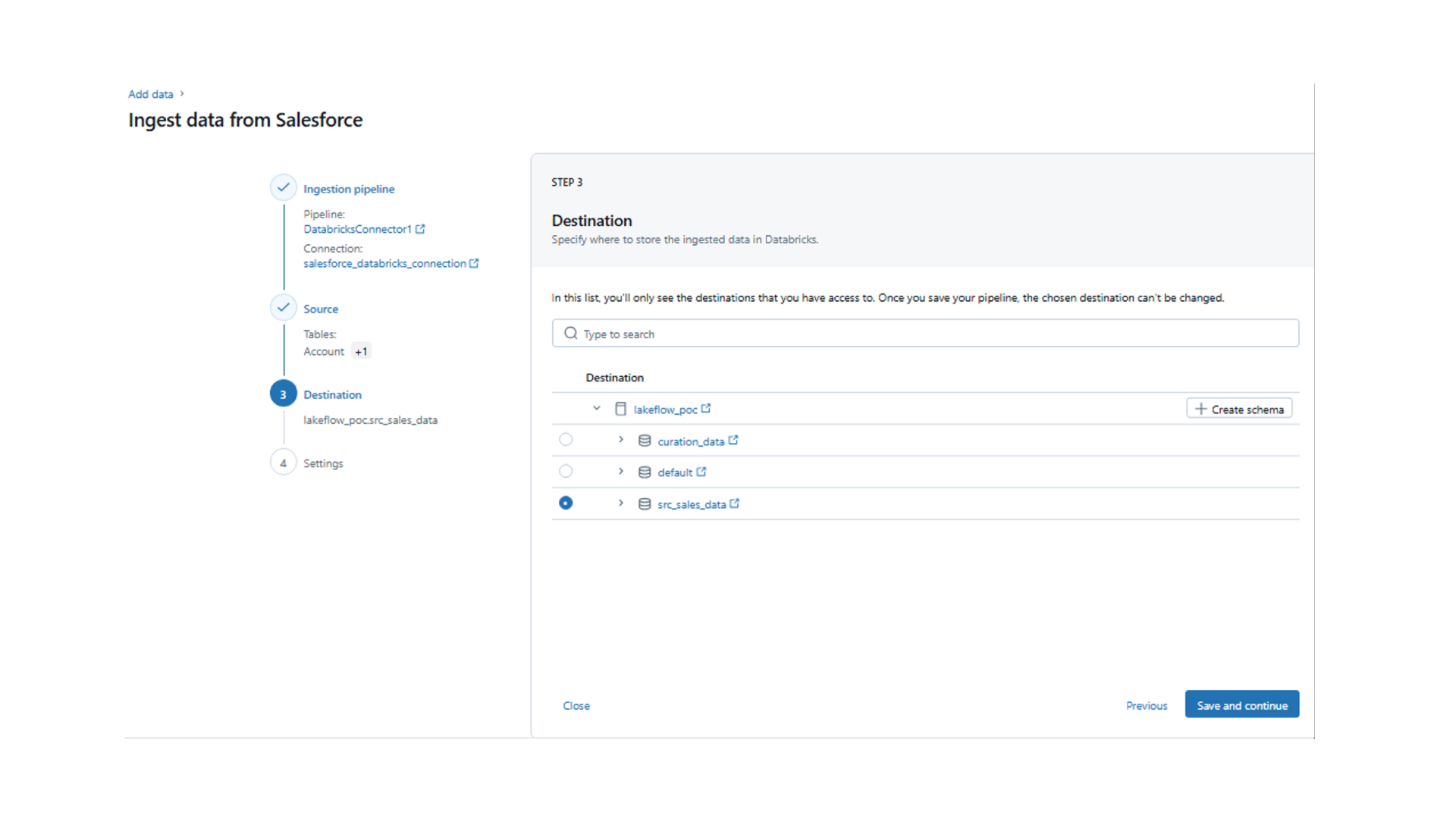
- Now select the destination schema where these source tables should be ingested, and this schema should be part of the unity catalog metastore.
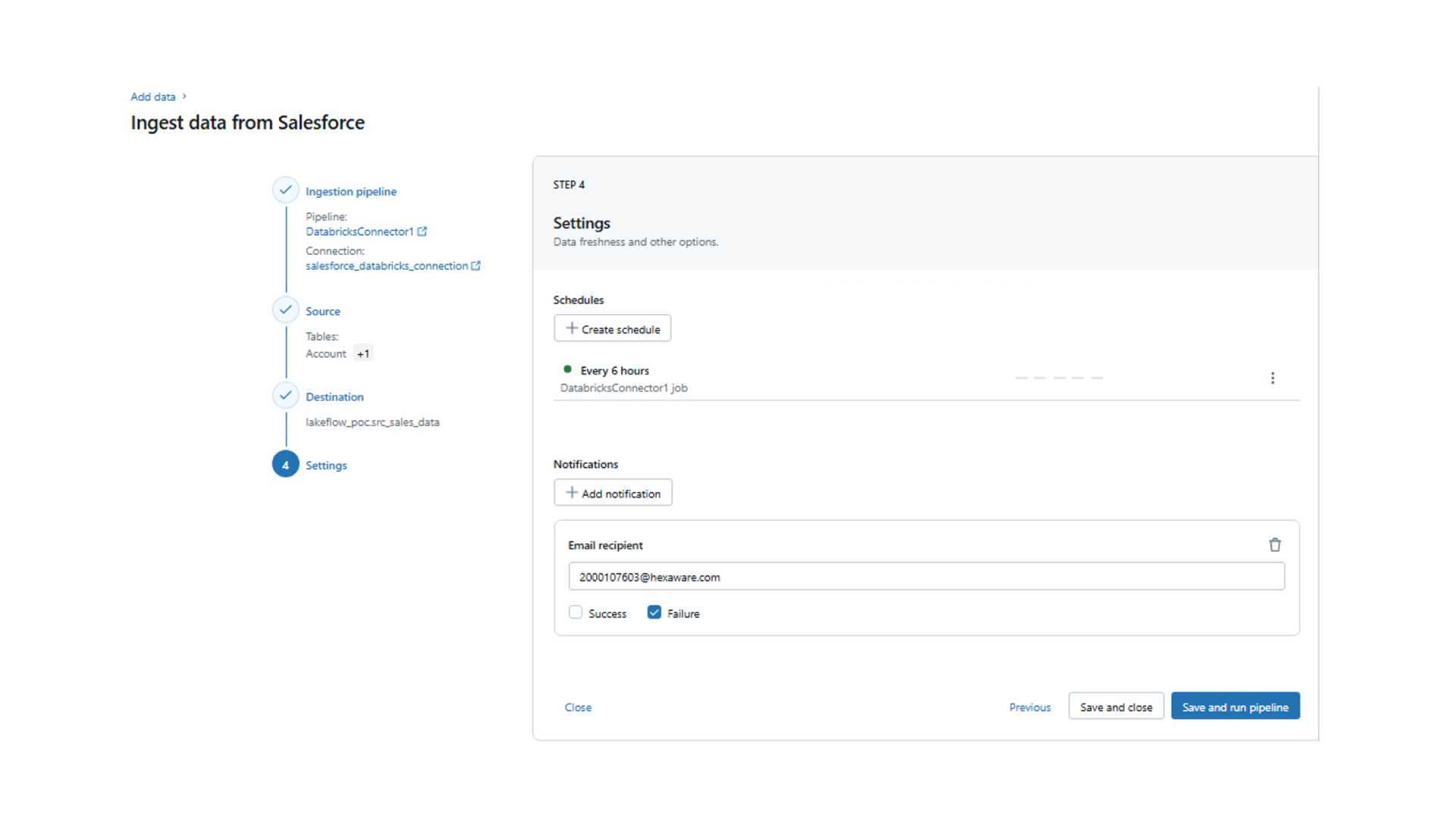
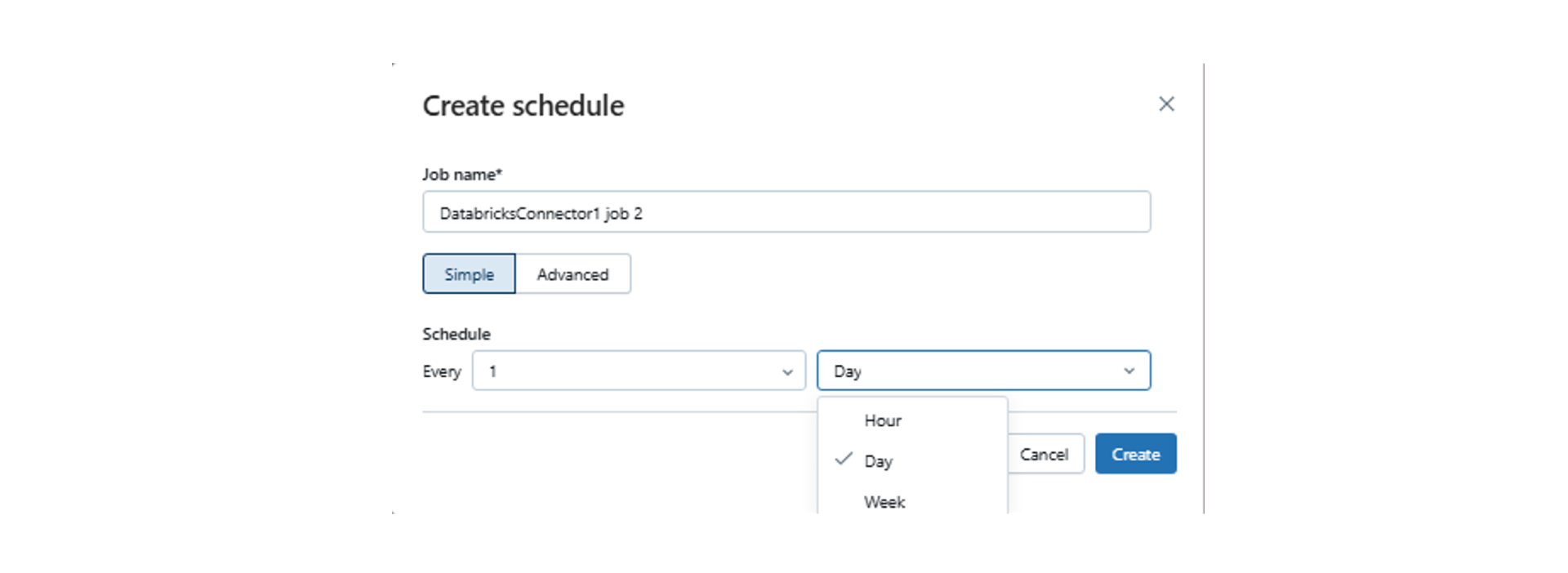
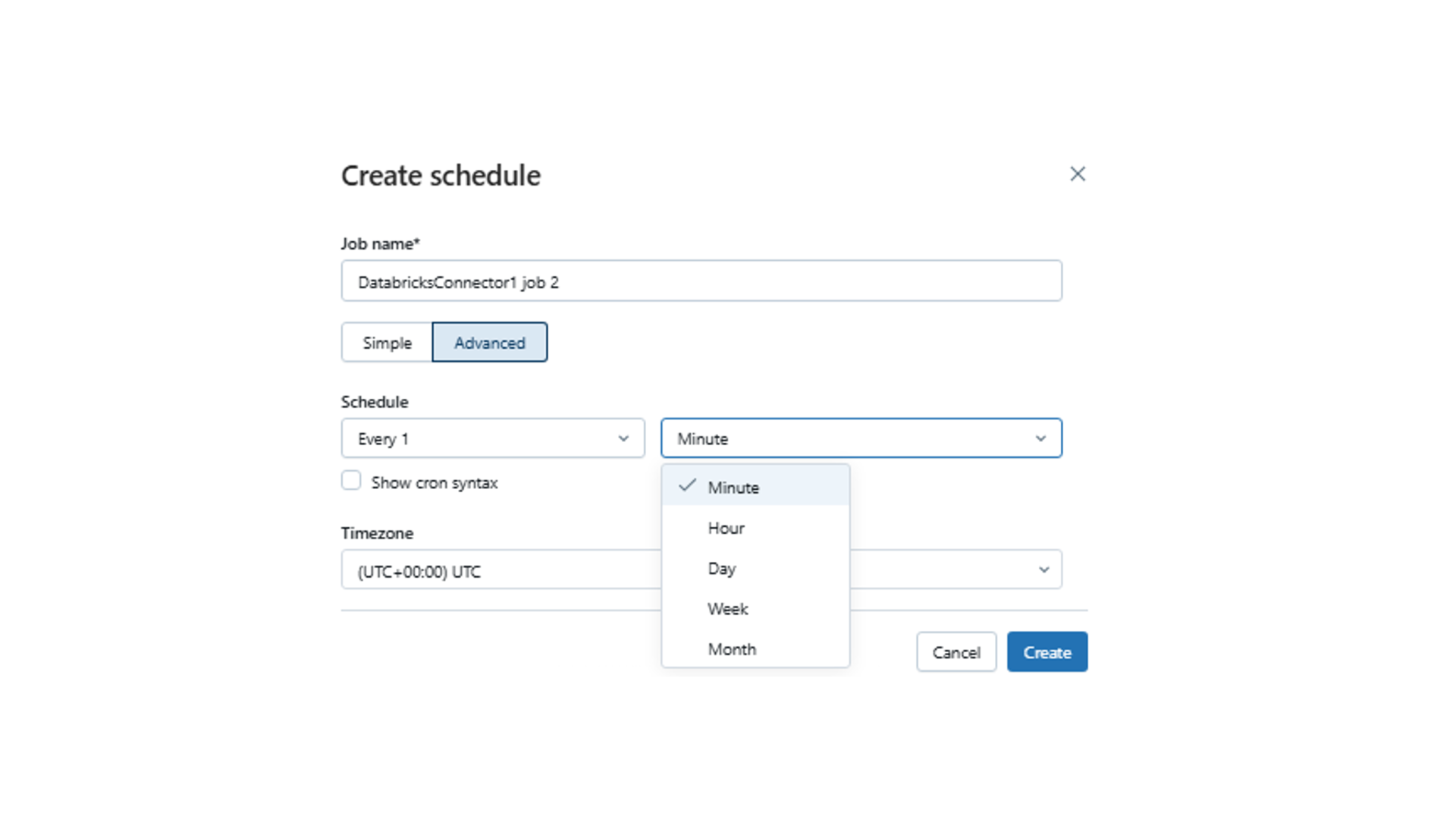
- Next, you can create the schedule as per the requirement Hourly, Daily, Weekly.
- If you want more schedule options, select ‘Advance’ and click ‘Create’.
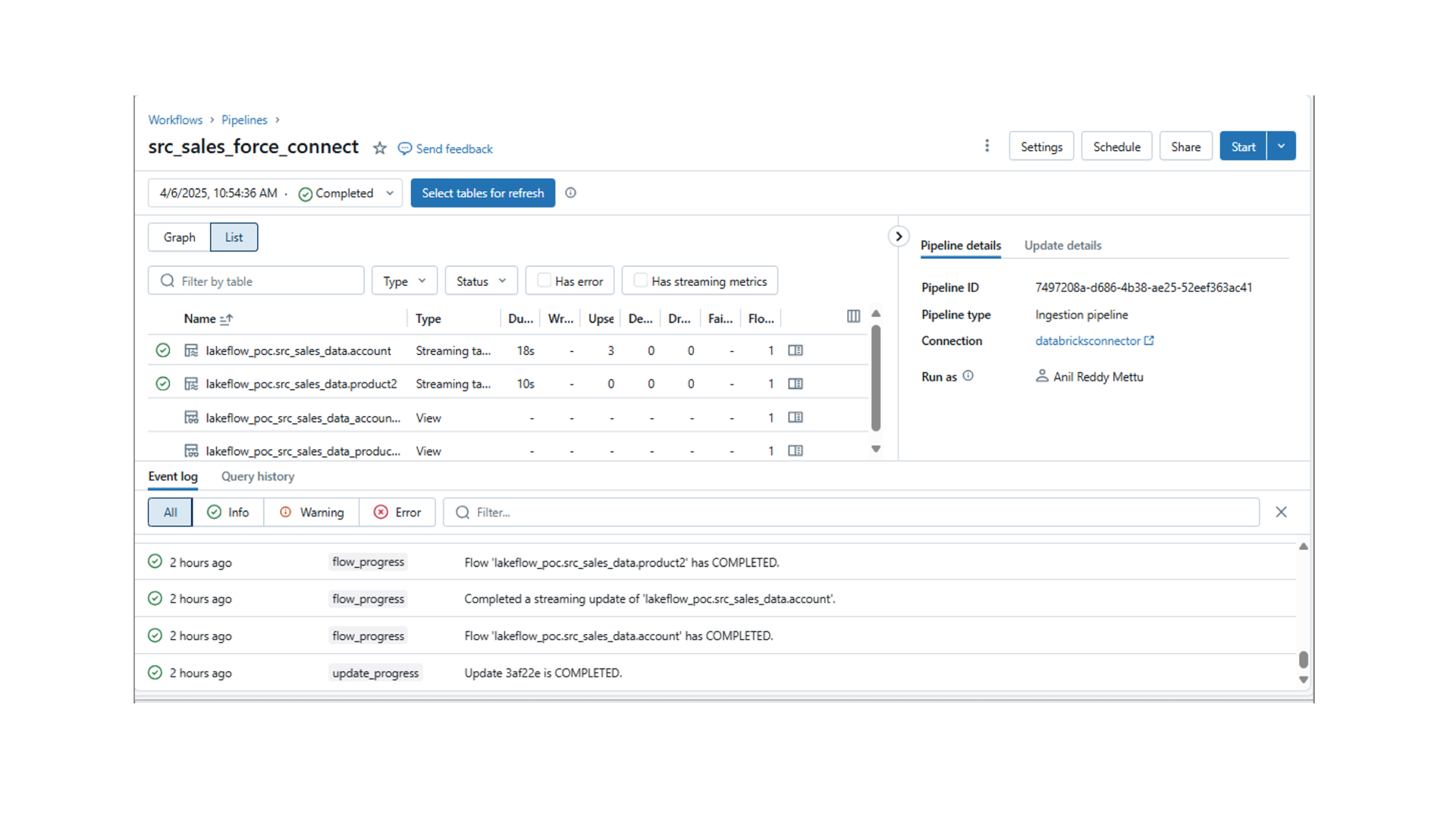
- After a schedule is created, click on ‘Save and Continue’ and the pipeline gets created in a few minutes. Once the pipeline is created and ready you will see the pipeline for which bronze tables should be created, and data will be loaded.
- With these steps, the account table has been loaded into a bronze table, and it will refresh as per the schedule.
Lakeflow Connect’s Strengths, Opportunities, and Limitations
Here’s a quick summary to help you decide when it’s the right fit for your needs.
|
Solution Strengths
|
Technical Opportunities
|
- Low-Code Simplicity: Quickly ingest, transform and orchestrate data pipelines with minimal coding.
- Native Connectors: Seamlessly integrate with sources like Salesforce, SQL Server, and Workday.
- Incremental Loading: Supports Change Data Capture (CDC) for efficient data updates.
- Rapid Development: Easily create bronze, silver, and gold layer architectures with built-in scheduling and visual pipeline tools.
|
- Extended compatibility: Compatible with the Unity Catalog metastore’s prebuilt tools.
- Cloud-agnostic Features: Availability of same features across Azure, AWS, and GCP.
- Extended Connectors: Support a wide set of native connectors, where some are still in public preview.
- Support on Custom Sources: Remove the need for additional tools or engineering effort for unsupported data sources.
|
Limitations of Databricks Lakeflow Connect
- Some connectors (e.g., Snowflake, Redshift) are still in development, which may limit immediate applicability for certain use cases.
- Dependency on Unity Catalog may require additional setup for organizations not yet using it.
Experience Unified, Intelligent Data Engineering with Hexaware
At Hexaware, we leverage Databricks Lakeflow Connect to deliver intelligent data ingestion solutions. By connecting your data from diverse platforms and cloud services, we enable faster, more secure insights. Our team ensures your enterprise data and AI projects are streamlined, automated, and ready for real-time analytics and AI.
With Hexaware and Databrick, you can focus on growing your business while we handle the complex data behind the scenes. Learn more about our Databricks partnership and let’s begin your journey toward true data intelligence.