Introduction
In today’s data-driven world, enterprises struggle with fragmented architectures that separate analytical and transactional workloads. Multiple tech stacks, integration friction, and governance challenges lead to operational inefficiencies and higher costs. Databricks Lakebase addresses these challenges by providing an open-source PostgreSQL-compatible, low-latency online transaction processing (OLTP) layer tightly integrated with Lakehouse.
Why Traditional Data Systems Fall Short
Traditional data systems separate transactional (OLTP) and analytical (OLAP) workloads into different platforms, creating fragmented architectures. This split leads to complex integration, delayed insights, and heavy reliance on ETL pipelines. Multiple tools increase operational overhead, governance gaps, and costs, while batch processing limits real-time decision-making. As businesses demand instant insights, AI integration, and simplified architectures, legacy systems struggle to deliver the performance, scalability, and agility modern enterprises require.
What is Transactional Analytics?
Transactional analytics involves analyzing operational data in real time or near real time as business transactions occur. It enables organizations to gain immediate insights without waiting for batch processing or data movement to separate systems. This approach helps improve decision-making. It bridges the gap between transaction processing and analytics for faster business outcomes.
The Need for Unified Transactional and Analytical Systems
Modern enterprises operate in an environment where real-time decisions are critical, yet most data architectures still separate transactional (OLTP) and analytical (OLAP) systems. This divide introduces data silos, complex integrations, and heavy ETL dependencies that delay insights and increase operational overhead. As organizations scale digital operations and adopt AI-driven use cases, they require a unified system that can process transactions and analytics on the same data, at the same time. Bringing these workloads together reduces latency, simplifies governance, and enables real-time transactional analytics without duplicating data or infrastructure.
What is Databricks Lakebase?
Lakebase in Databricks is a next-generation OLTP database integrated directly into the Databricks Lakehouse platform. It’s designed for AI-driven applications and modern development workflows, combining transactional and analytical capabilities without the need for complex extract, transform, load (ETL) pipelines.
How Databricks Lakebase Enables Modern Transactional and Analytical Workloads
Databricks Lakebase enables modern transactional and analytical workloads by unifying OLTP and OLAP on a single Lakehouse platform. It introduces a PostgreSQL-compatible, low-latency transactional engine tightly integrated with Delta Lake, allowing operational data to be analyzed in real time without complex ETL pipelines. With built-in CDC-based real-time synchronization, organizations can run transactions and analytics on the same data consistently. Features like separation of compute and storage, instant database branching, Unity Catalog governance, and native AI integration further simplify architecture, reduce latency, and support scalable, AI-ready applications on one unified data platform.
What’s New with Databricks Lakebase?
Lakebase introduces a paradigm shift for Databricks users by merging transactional and analytical workloads into a single platform. Traditionally, Databricks has been synonymous with data lakes and advanced analytics, but Lakebase extends its capabilities to operational systems.
- Native support for transactional workloads within Databricks
- Integration of Postgres-based Lakebase for real-time data handling
- Enhanced governance and security through Unity Catalog
- Seamless AI and ML integration for operational data
How Databricks Lakebase Works (Architecture Explained Simply)
Databricks Lakebase works by embedding a low-latency, PostgreSQL-compatible transactional engine directly into the Databricks Lakehouse architecture. Instead of moving data between separate OLTP databases and analytical platforms, Lakebase keeps operational and analytical data tightly connected. Transactional data written to Lakebase is continuously synchronized with Delta Lake tables through change data capture (CDC), making it immediately available for analytics, AI, and reporting. With decoupled compute and storage, built-in autoscaling, and unified governance via Unity Catalog, Lakebase delivers a simplified architecture that supports real-time transactions and analytics on the same data, securely and efficiently.
Key Features of Databricks Lakebase for Real-Time Data and AI
- Postgres Compatibility
- Uses open-source Postgres engine.
- Supports ACID transactions, constraints, and standard SQL syntax.
- Separation of Compute and Storage
- For low-latency transactional (OLTP) workloads and frequent INSERT, UPDATE, and DELETE operations, data is stored in vanilla PostgreSQL page format. This allows the embedded Postgres engine to achieve single-digit millisecond latency and high concurrency, functioning like a traditional, high-performance operational database.
- Compute scales independently for cost optimization.
- Instant Database Branching
Create instant, isolated database branches for dev/test/debugging without duplicating data.
- Real-time Data Synchronization
It supports automatic, continuous synchronization (via change data capture, or CDC) between Lakebase and Delta Lake tables in the lakehouse.
- Unified Governance with Unity Catalog
Unity Catalog governance in Lakebase provides a single point for access control, data lineage, auditing, and compliance across both transactional and analytical workloads.
- Integrated with AI & Lakehouse
Lakebase is designed for modern AI applications, serving as an online feature store for low-latency model serving and supporting retrieval-augmented generation (RAG) workflows.
When Do You Get to Use Databricks Lakebase Features?
Lakebase, announced on June 11, 2025, became generally available on February 3, 2026, and is now available to all customers with full support and documented capabilities. Read more.
Lakebase Architecture vs Traditional Data Architecture
Comparing Traditional Dataflow Architectures with the Lakebase Approach
Traditional Dataflow Architectures
Traditional architecture keeps operational (OLTP) and analytical (OLAP) systems isolated because OLTP requires low latency that typical analytical platforms can’t guarantee. Below is the old architecture diagram:
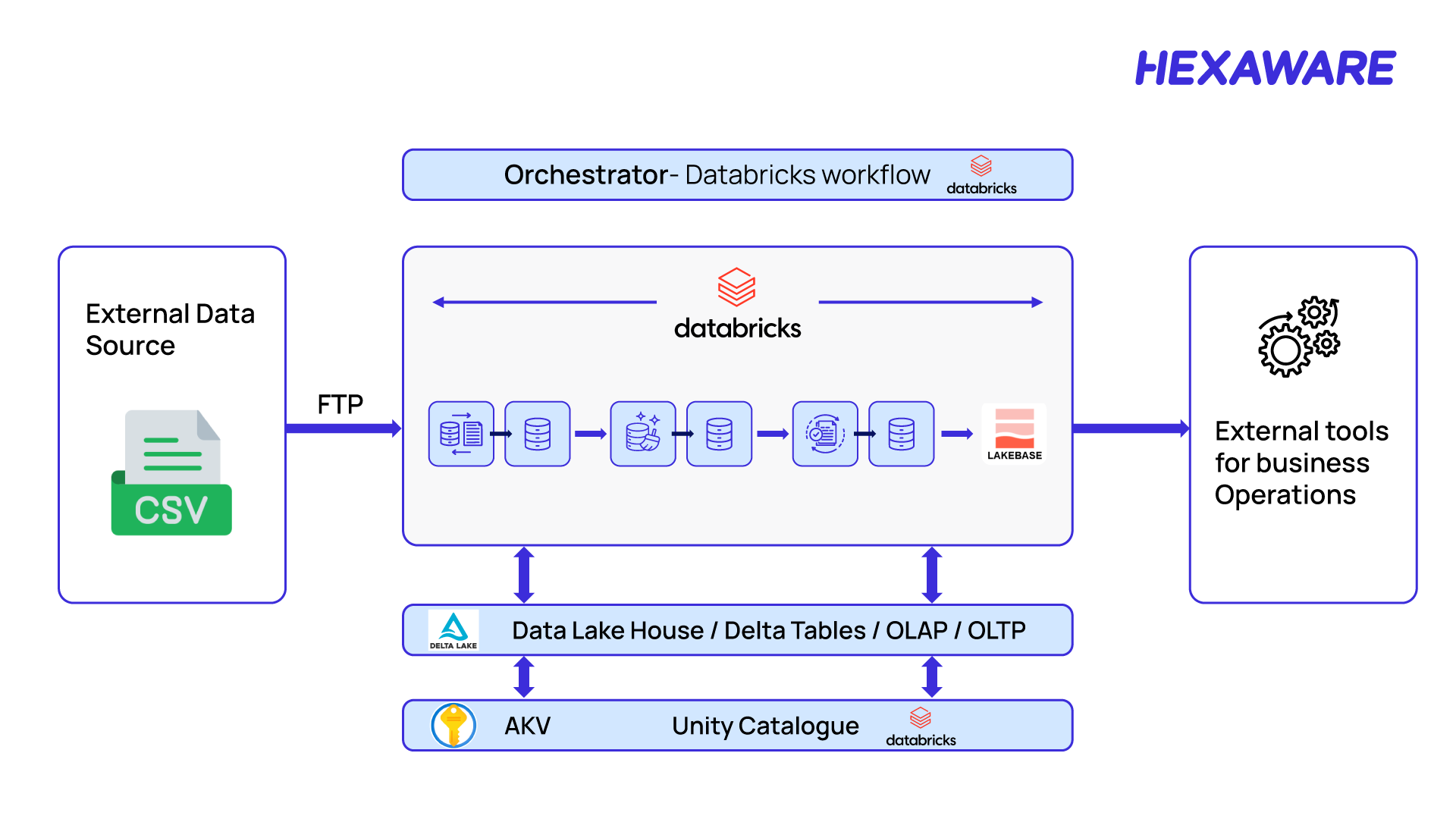
Figure 1: Traditional dataflow architecture
In a traditional dataflow architecture, the data is ingested into the Lakehouse from external sources, processed in Databricks, and then synchronized to SQL Server via reverse ETL, enabling business operations tools to consume it for transactional workflows.
Challenges in Existing Architecture
Traditional architectures often involve multiple technologies for OLAP and OLTP, leading to:
- Multiple tech stacks → operational complexity
- Integration friction between systems
- Higher skill and staffing requirements
- Cost, performance, and resource inefficiency
- Tooling and governance fragmentation
- GenAI integration gaps
Lakebase Architecture
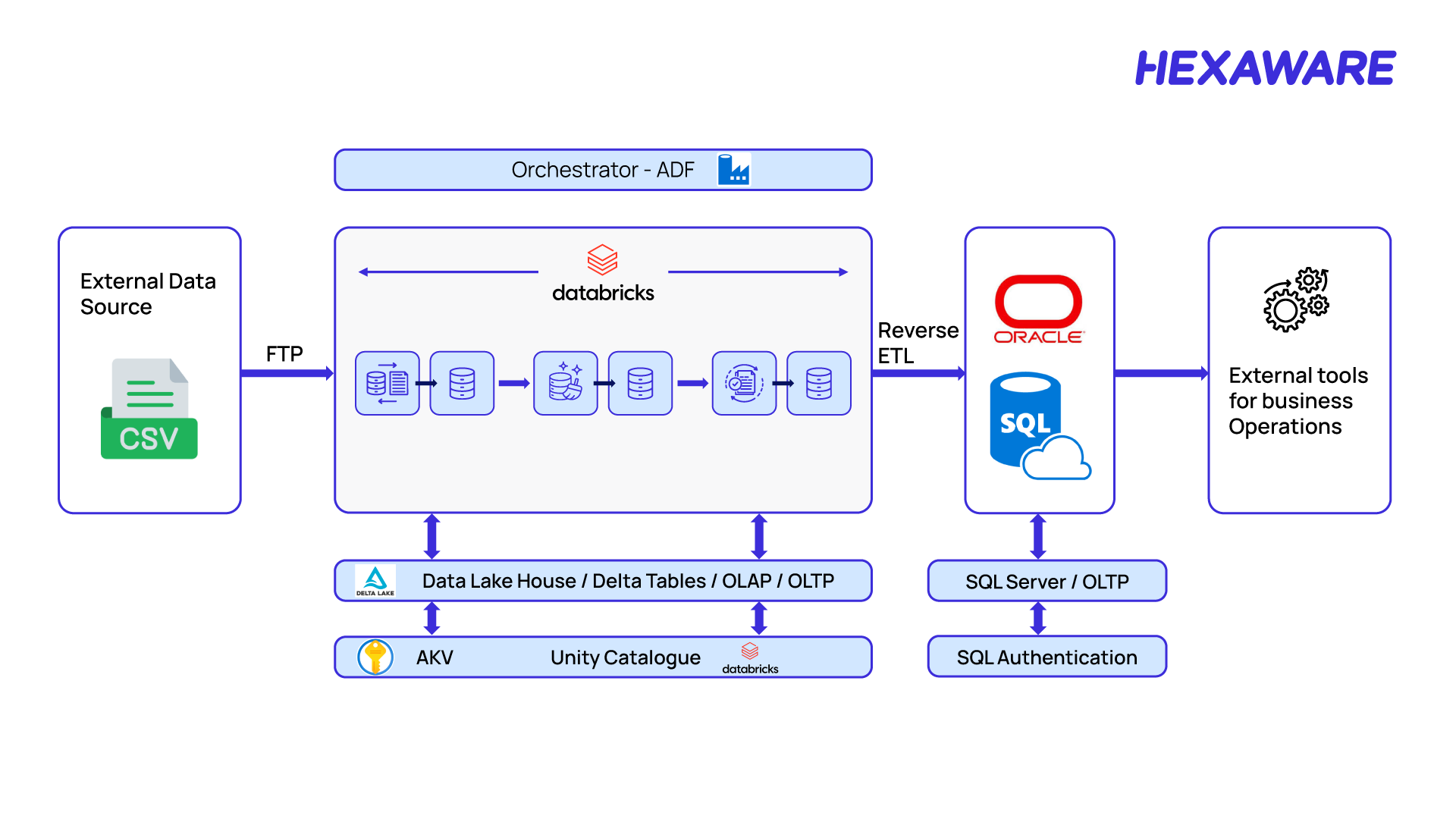
Figure 2: Lakebase Architecture
Benefits of Databricks Lakebase for Enterprises
Benefits of Lakebase:
- Unified tech stack within Databricks.
- Accelerate solution delivery with Postgres compatibility powered by Lakebase.
- Easy to maintain and manage.
- Unified data governance through Unity Catalog.
- Cost-effective with a single billing unit.
- Sync tables allow easy OLAP ↔ OLTP data movement.
- Seamless GenAI integration.
When Should You Use Databricks Lakebase?
Lakebase is an excellent fit if you are looking to simplify complex, multi-system data architecture, build real-time AI applications, or consolidate your operational and analytical data within the Databricks ecosystem. Its PostgreSQL compatibility makes integration seamless.
It may not be the right fit if you require absolute stability and extensive community support of a fully mature, battle-tested database for a highly critical legacy application, or if you need features specific to non-PostgreSQL systems.
Let’s help you adopt Lakebase for low-latency operations and AI-driven insights. To explore Hexaware’s deep expertise and solutions built on Databricks, visit our dedicated partner page here.
How to Get Started with Databricks Lakebase
Let’s dive into the steps to integrate OLTP with the Lakehouse using Lakebase for a seamless data flow.
Steps to Enable and Create a Lakebase Instance
- Create a Lakebase Database: As of March 12, 2026, new Lakebase resources are created as Lakebase Autoscaling projects by default. The older Lakebase Provisioned (instance-based) model is still supported only for existing instances.
- Option 1 (Recommended): Create a Lakebase Autoscaling Project (UI). This is the default and preferred way to create Lakebase now.
- Prerequisites:
- Databricks workspace with Lakebase enabled
- You must have permission to create database resources (most users do by default)
Let’s see a pictorial representation highlighting a step-by-step process to know how to enable and create a Lakbase:
Step 1 – Open the Lakebase app: Click the App icon. Apps in the top right corner and select Lakebase Postgres.

Figure 3: How to open the Lakebase application
Step two: The UI opens in Autoscaling mode (default for new resources).
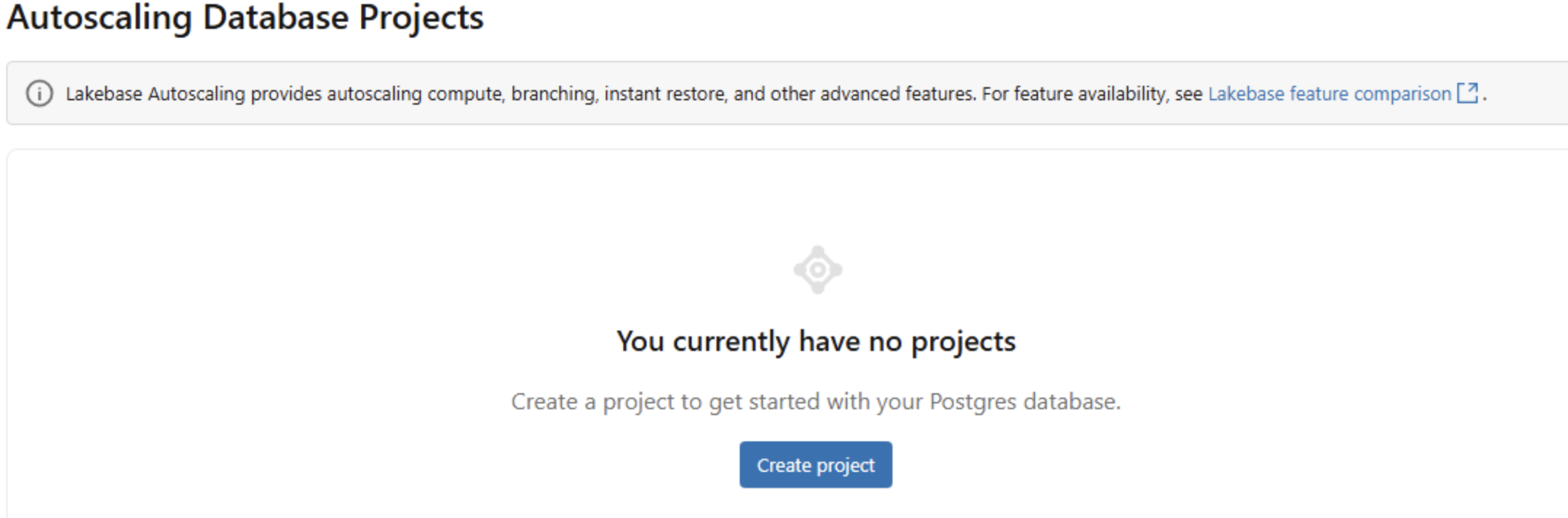
Figure 4: How to auto-scale database projects
Step three: Create a new project.
- Provide Project name
- Postgres version (recommended default unless you have compatibility needs)
- Project created with a production branch
- A default database named databricks_postgres
- Autoscaling compute enabled
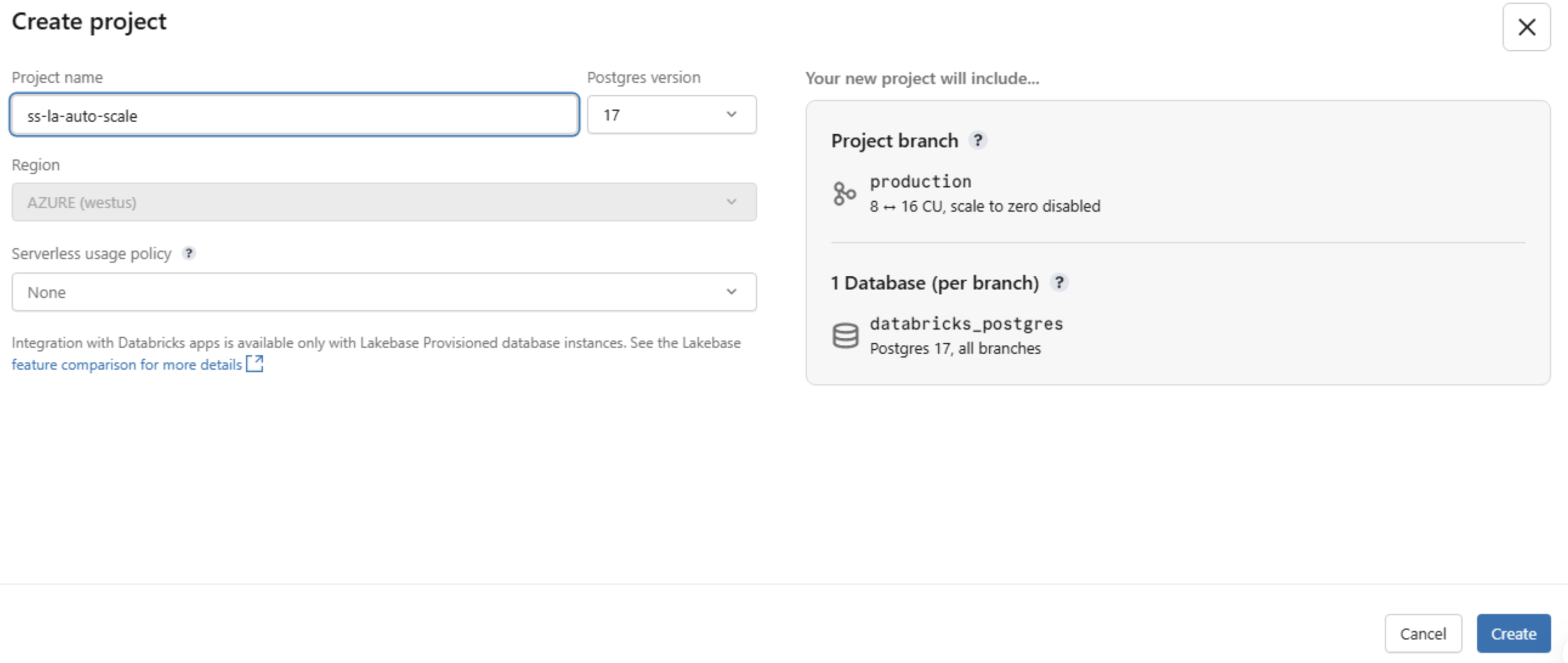
Figure 5: How to create a new project
- Connect to the database
- Select the production branch
- Click Connect
- Connect to the database
Step four: Connect to your database
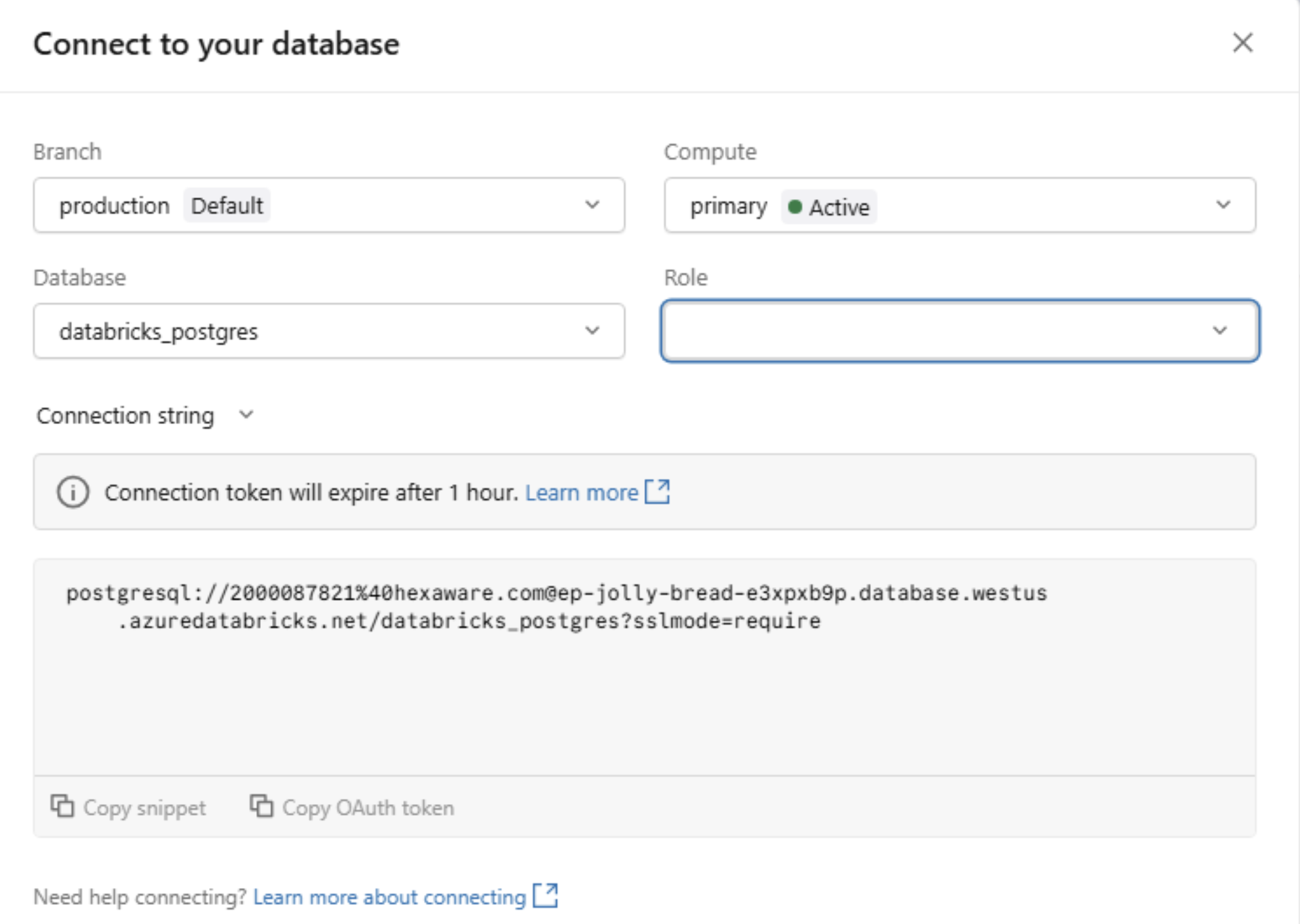
Figure 6: How to connect to a database
Step five: Create a synced table from the Catalog (UI).
To sync an existing Delta table from the Lakehouse to Lakebase, configure the destination PostgreSQL database instance created earlier, specify the primary key settings, and set the sync mode.
- In your Databricks workspace, open Catalog.
- Navigate to the Unity Catalog Delta table you want to serve.
- Click Create ▸ Synced table.
- Pick the target catalog & schema (these determine where the synced table object lives) and enter a synced table name.
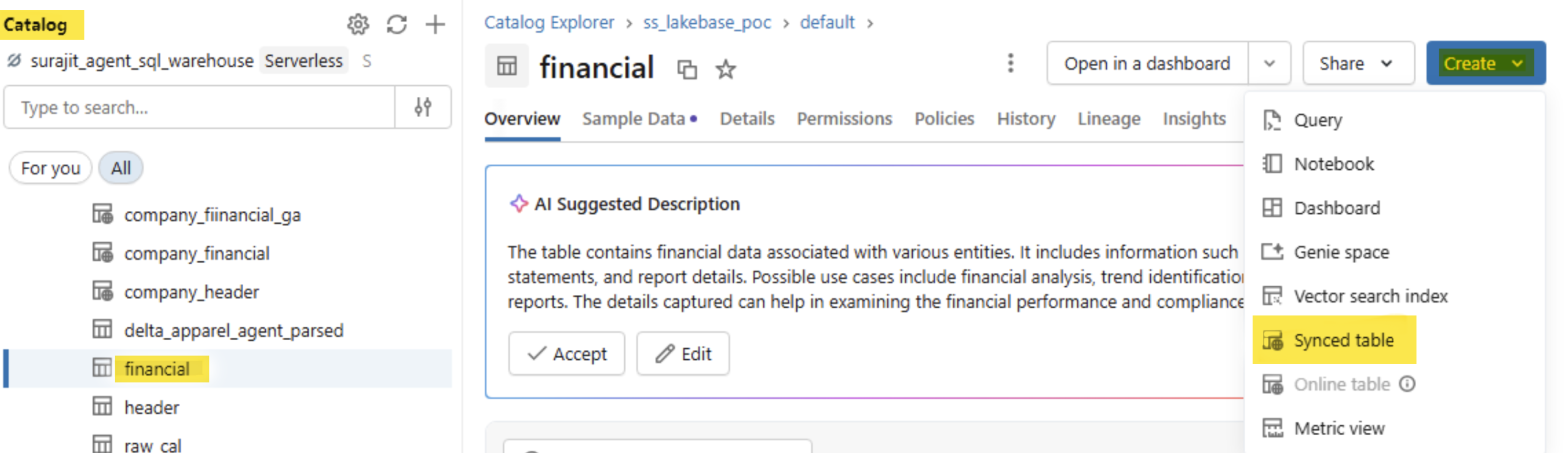
Figure 7.1: Create a synced table from the catalog
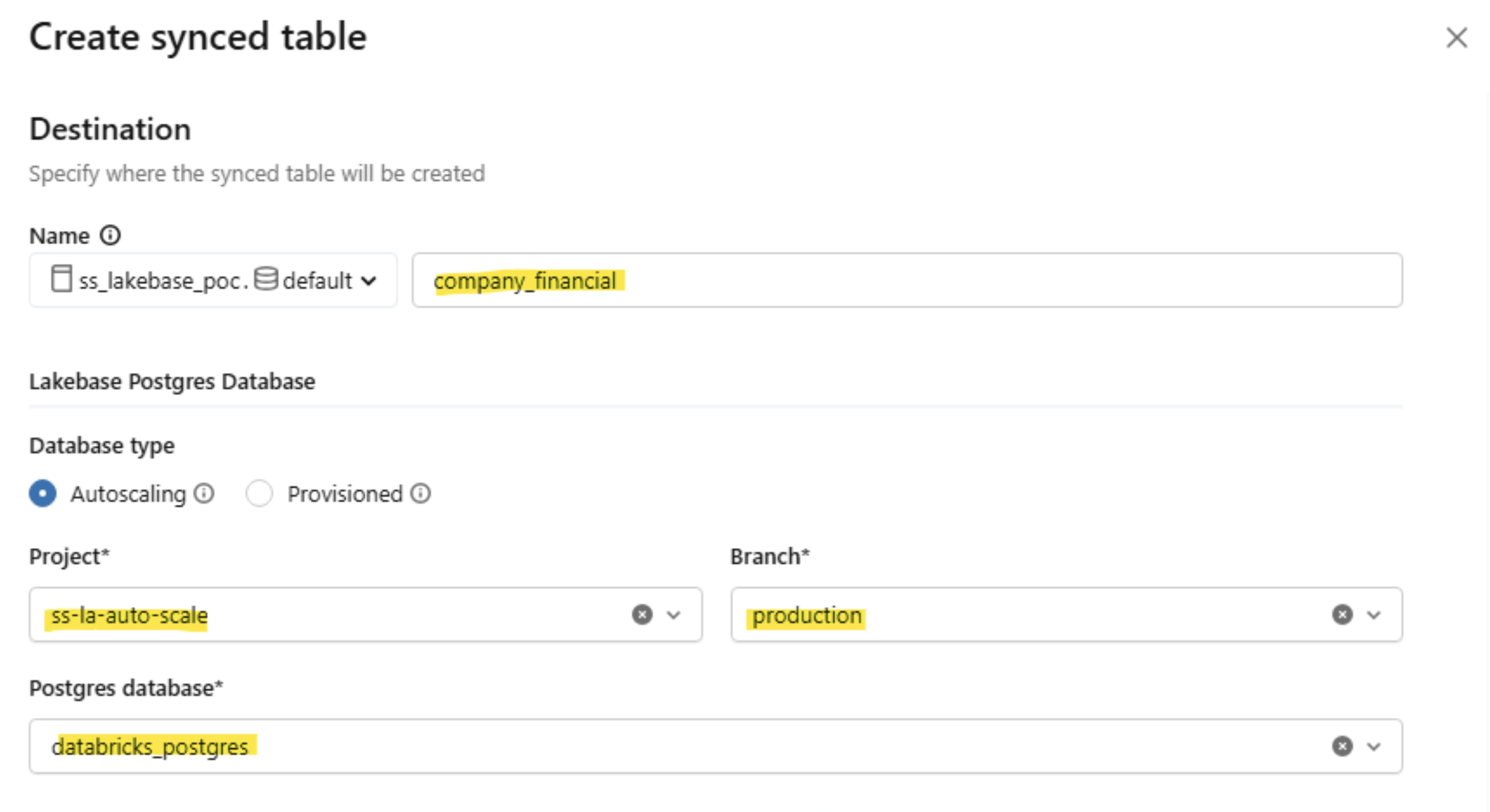
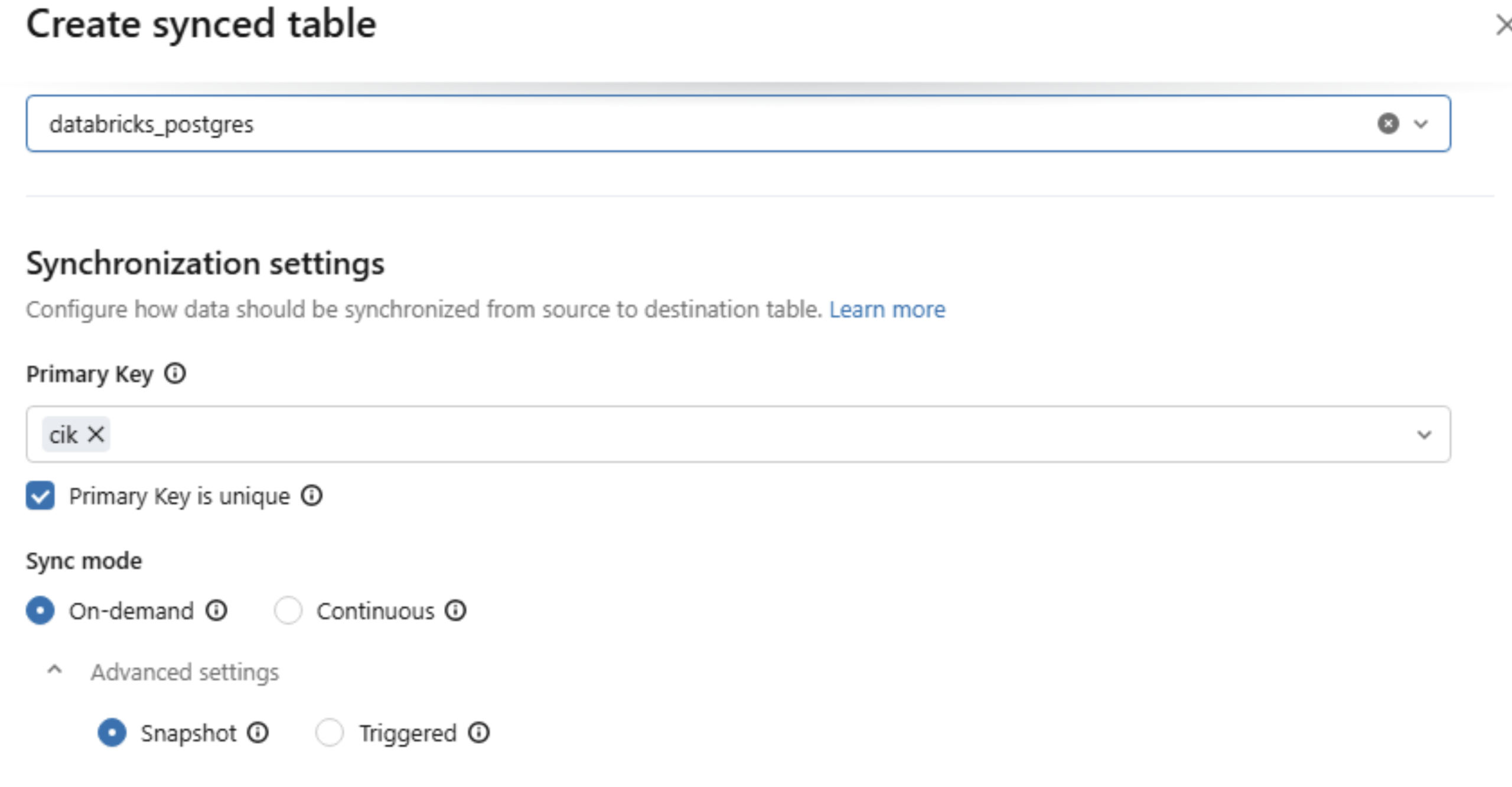
Figure 7.2: Create a synced table from the catalog
Step six: Querying Lakebase:
To query a table in Lakebase, open the SQL Editor from the left panel, select the previously created PostgreSQL instance, and execute your query.
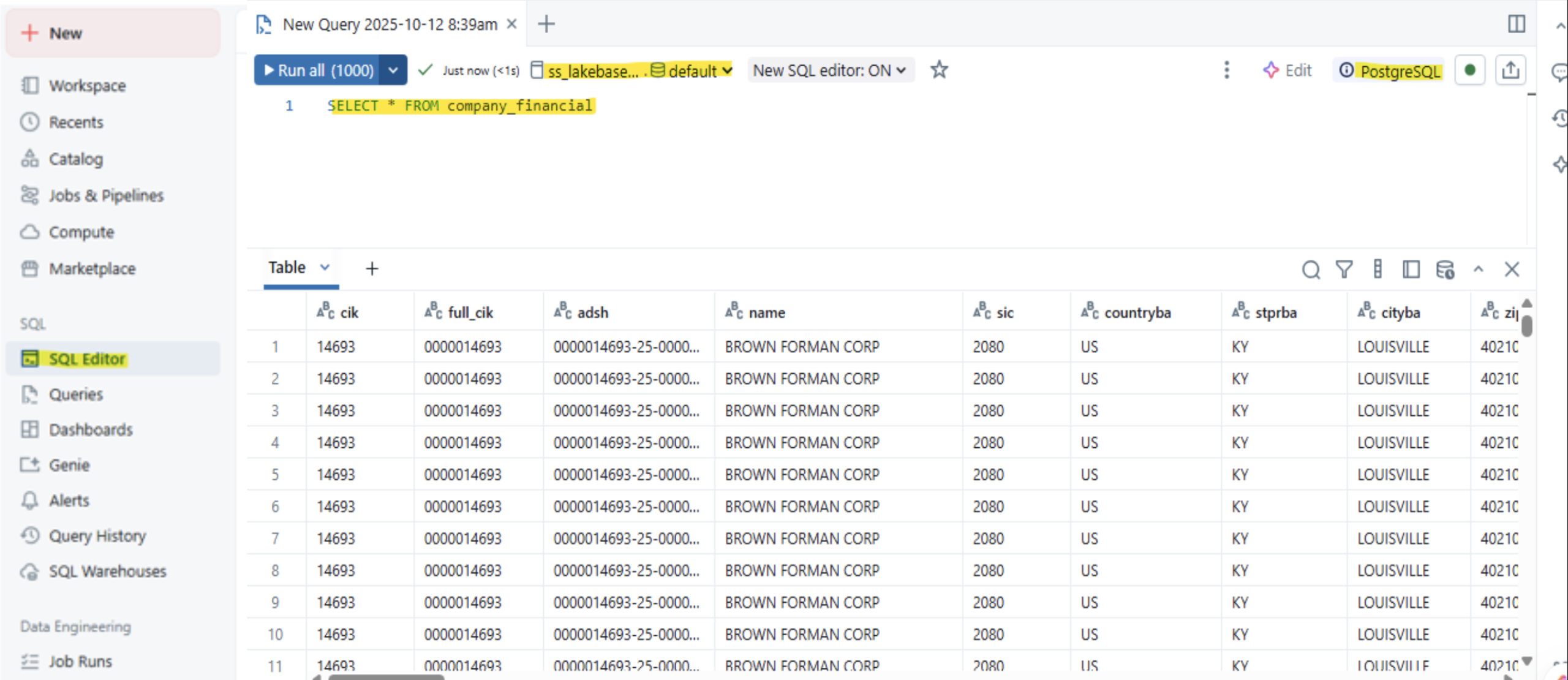
Figure 8: Checking query in Lakebase
Lakebase Strengths, Opportunities, and Limitations
Here’s a quick summary to help you decide when it’s the right fit for your needs.
|
Category |
Summary Points |
|
Solution Strengths |
Unified Platform: Eliminates complex ETL by combining OLTP and OLAP on one system. PostgreSQL Compatibility: Leverages existing tools and skills. Serverless & Scalable: Decoupled compute/storage auto-scales for cost efficiency. Unified Governance: Uses Unity Catalog for consistent security and auditing across all data. |
|
Technical Opportunities |
Real-Time Applications: Ideal for low-latency operational applications, such as order management. AI/ML Acceleration: Serves as a low-latency online feature store for real-time model inference. Modern Dev Workflows: Instant database branching simplifies testing and development. |
|
Limitations |
Maturity: As a new product, it may have fewer community resources, integrations, or edge-case solutions than mature databases like PostgreSQL or SQL Server. |
Table 1: Summary table
More Resources
Check out these latest resources to help you gain more knowledge about Azure Databricks documentation and Lakebase Postgres. These Databricks Lakebase resources provide more insights into the latest features and updates.
Accelerate Your Move to Unified Data with Lakebase
Bring OLTP and OLAP together for faster, smarter decision-making.