“The only person who is educated is the one who has learned how to learn and change” – Carl Rogers

We have always been complaining about the grading system in our school, colleges and even in universities. We were never been able to satisfy ourselves, why different boards, universities got different grading systems.
Assigning Grades is not easy! Some of the factors that can (or should) affect grade assignment include: the size of the class, the weights assigned to different components, the quality of students in the class, the quality of faculties, the degree of difficulty of the course, the degree of difficulty of the exams and quizzes, etc. It is not surprising, therefore, that a number of grading methods are being used by educational institutions.
Education system in India is fast changing and against this backdrop we have what is known as the Gradebook of PeopleSoft Campus Solutions at the disposal of faculties and students alike. With instant access from any browser, you can use the Web to deliver course- and grade-related service to your instructors, giving you an edge in the increasingly competitive higher education landscape.
Campus Solutions Gradebook will not only automate the grading process but also facilitates communication between the faculties and students. Students not only will be able to view the grades given by the faculties but also will be able to keep a track of the faculty comments.
The criticality comes into picture when different faculties have different parameters for grading. Some faculties can grade based on only Final Examination, however some faculty can sub-divide the grade based on different seminars, home-work, class tests and final examination. In PeopleSoft CS 9.0 you get the feature to sub-divide the parameters as many or as less per faculty convenience.
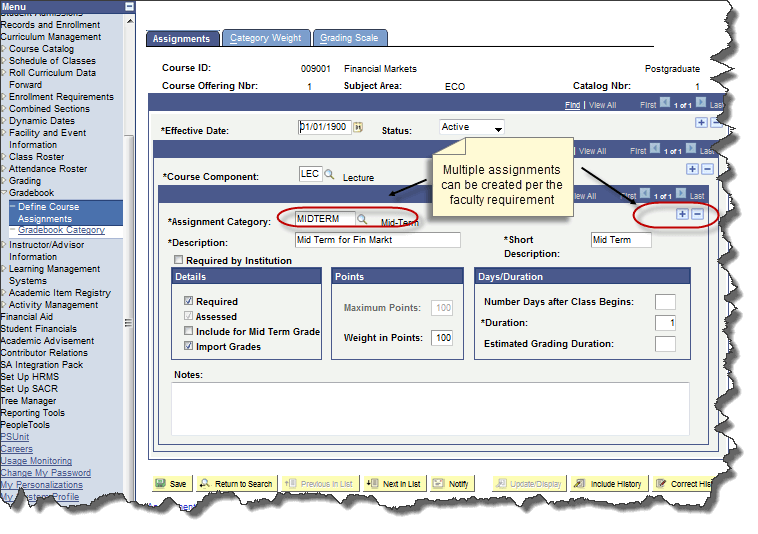
The overall benefits of using PeopleSoft campus Solutions Gradebook module is:
- Creating assignments to evaluate based on different parameters.
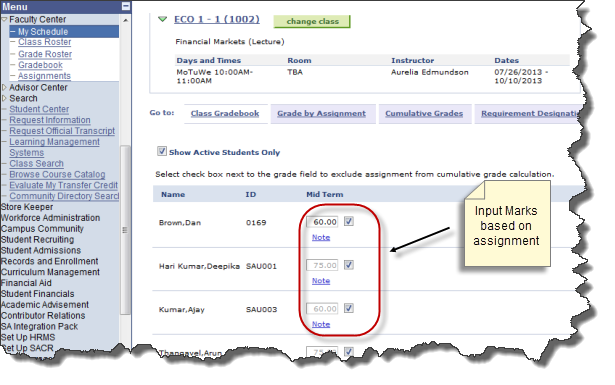
- Auto grade calculation by the input of marks based on defined grading scale
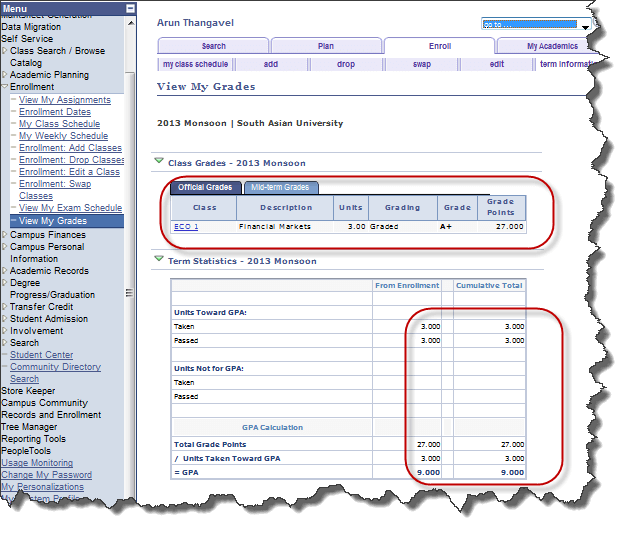
- Student self-service view for grades, assignments and comments
- Non-graded assignments can be marked and excluded automatically from the grade calculation
With PeopleSoft Gradebook, faculties can access
- Define assignments for a course or class
- Track assignments and assessments
- Record specific notes about individual students
- Report midterm or deficiency grades
- Report final grades
Using PeopleSoft Gradebook along with PeopleSoft Campus Self Service, students can access
- Details about assignments
- Grades for each assignment
- Personal notes from their instructors
- Midterm and final grades
Process-Flow
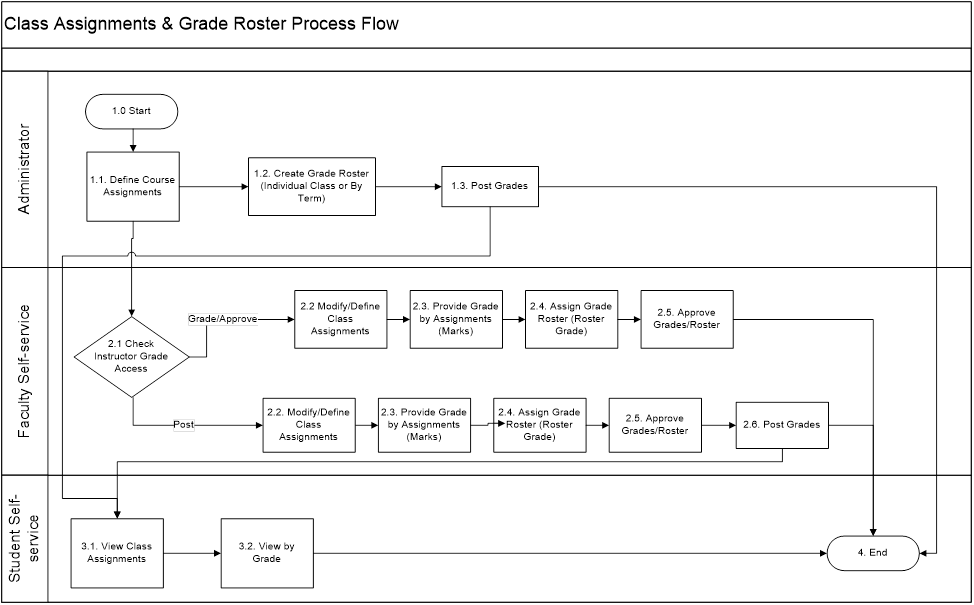
Gradebook is automated with the standard process of grade calculation
The weighted grades for individual assignments:
(Student’s grade in point’s × assignment weight) ÷ Maximum grade in points for the assignment
The cumulative assignment category grades:
Total of assignment weighted grades / total weight of assignments that count for the category (not including extra credit)
Other notable features in PeopleSoft Gradebook includes
- Grade Management
- Flexible tools to fit your grading style
- Optionally let students and faculty login to view information.
- Online Access — Mostly it is intranet based, however it can also be exposed to the internet.
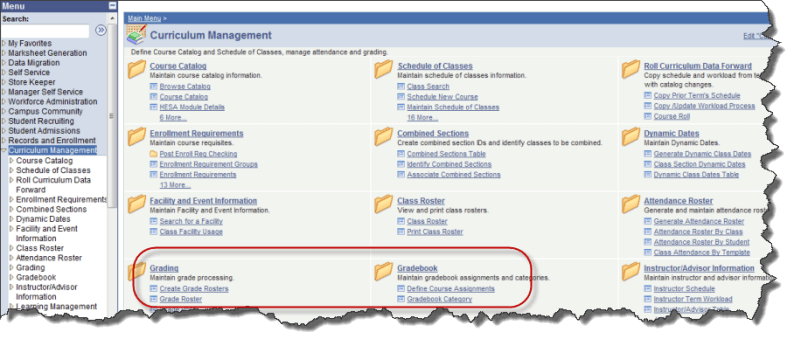
Easy Navigation
Self-Service – Marks allocation
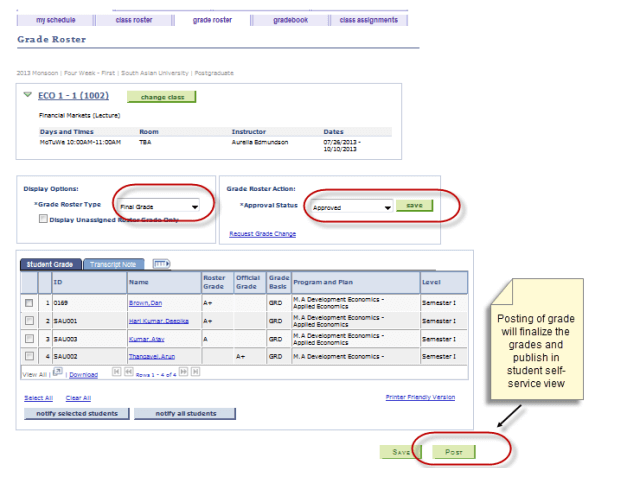
Finalizing Grades through faculty Self Service
Security control can be well managed for the individual instructor from posting the student grades in the Gradebook. Only the primary instructor can do the approval and post for the grading provided by the secondary instructors.
The different levels of security are:
Approve: Instructor can enter grades and approve the grade roster.
Grade: Instructor can only enter grades for the class.
Post: Instructor can enter grades, approve the roster, and post the grades.
Student Self-Service Grade view
In short Oracle’s approach to this critical process transforms an administrative function, creating a flexible, dynamic solution that supports student success, while maintaining the security and controls institutions require.