One of our servers crashed and we had lost the complete file system and the Informatica folder. However,the repository database was on another server and it was intact. It was a challenge for the Informatica Administration Team to restore & recover several components including:-
- Powercenter Services
- Data Quality / Analyst Services
- Data Transformation Projects
- Data Validation Option for the Server
- Data Virtualization Services
Server Characteristics
- Powercenter & DQ Metadata was available in the databases which were configured for the corresponding Repositories
- Number of Users in the server = 10
- Number of Folders in Powercenter = 25
- Number of Projects in DQ = 10
- Data Transformation Projects = 5
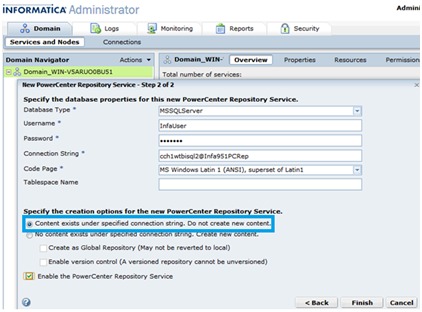
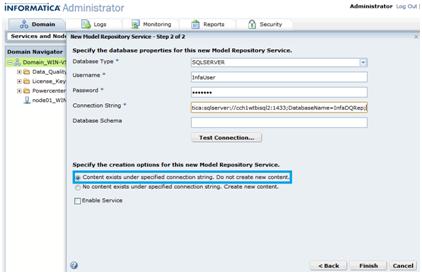
We leveraged the “Content Already Exists in the Specified Database” feature available in the Informatica Administrator Tool during the re-installation process to re-install the server (Domain) & to re-establish connection with the existing repository.
Using the steps mentioned below, we could restore all the data successfully except the previously created users (we re-created the users)
Scenario: Recovery from the loss of the Informatica Server File-System folders
Recovery Process
- Re-Installation of Domain
- Step-1: Copy any backup data from the server machine if present & required
If any Data Transformation projects were created in the old server, they can be copied from the default location for Data Transformation folder which is “C:\Documents and Settings\<user>\My Documents\Informatica\DataTransformation”. Later, these projects can be imported back after the entire server is “UP” again.
- Step-2:Run the uninstallation setup in the machine where the server existed previously.
This is to make sure that no entries exist in the registry or anywhere else in the machine. Also, make sure to manually check the “C:/Program Files/” location and the old installation directory to see if any installation data is left out. Delete the same if present.
- Step-3:Run the I9PI Tool to test the system requirements
This confirms that the old version & database of the old domain is still valid for the re-installation
- Step-4:Install the server using the same steps as we use to install a fresh server
We can also re-use the Database of our old Domain in case it is available.
- Step-5:Check the Installation Success Log
This ensures that the server is successfully installed. We should also check system services to confirm that the Informatica 9.5.1 service is running.
Creation of New Repositories using old metadata from old repositories
-
- Step-1: Open Administrator Tool & create the Powercenter Repository with the “Content exists under specified connection string” option as highlighted below:-
- Step-2: Create the Model Repository Service in the same manner
- Step-3: Create Integration Service, Data Integration Service & all other required services using the Administrator Tool.
User Creation
Because of unavailability of the Domain Metadata, we had to recreate the users / groups & roles.
DVO Re-configuration
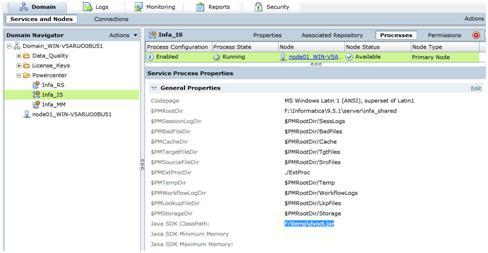
DVO version- 9.5.2 was using the Powercenter Repository just restored, for this version, we need to paste DVOCT.jar file in the server location & set the Java SDKClassPath from Integration service processes tab (see snapshot below).
After Restoration Checks
After restoration, check whether all services are “UP & Running”. Also check repositories from Powercenter / Data Quality Client Tools toconfirm that the mappings are running successfully by executing / testing sample mappings.
This completes the restoration of Informatica 9.5.1 server & repositories without losing any information or with manageable changes to the server.
Using the above steps, we were able torecover the entire serverin 2 hours.